This is the full developer documentation for Tauri
# Tauri 2.0
> The cross-platform app building toolkit
Create small, fast, secure, cross-platform applications
[Get started](/start/)[Tauri 1.0 Documentation](https://v1.tauri.app)
Create a Project
* Bash
```sh
sh <(curl https://create.tauri.app/sh)
```
* PowerShell
```sh
irm https://create.tauri.app/ps | iex
```
* Fish
```sh
sh (curl -sSL https://create.tauri.app/sh | psub)
```
* npm
```sh
npm create tauri-app@latest
```
* Yarn
```sh
yarn create tauri-app
```
* pnpm
```sh
pnpm create tauri-app
```
* deno
```sh
deno run -A npm:create-tauri-app
```
* bun
```sh
bun create tauri-app
```
* Cargo
```sh
cargo install create-tauri-app --locked
cargo create-tauri-app
```
[Frontend Independent](/start/frontend/)
[Bring your existing web stack to Tauri or start that new dream project. Tauri supports any frontend framework so you don’t need to change your stack.](/start/frontend/)
[Cross Platform](/distribute/)
[Build your app for Linux, macOS, Windows, Android and iOS - all from a single codebase. Write your frontend in JavaScript, application logic in Rust, and integrate deep into the system with Swift and Kotlin.](/distribute/)
[Maximum Security](/security/)
[Front-of-mind for the Tauri Team that drives our highest priorities and biggest innovations.](/security/)
[Minimal Size](/concept/size/)
[By using the OS’s native web renderer, the size of a Tauri app can be little as 600KB.](/concept/size/)
# What is Tauri?
> Information for getting up and running with Tauri, including prerequisites and installation instructions
Tauri is a framework for building tiny, fast binaries for all major desktop and mobile platforms. Developers can integrate any frontend framework that compiles to HTML, JavaScript, and CSS for building their user experience while leveraging languages such as Rust, Swift, and Kotlin for backend logic when needed.
Get started building with [`create-tauri-app`](https://github.com/tauri-apps/create-tauri-app) by using one of the below commands. Be sure to follow the [prerequisites guide](/start/prerequisites/) to install all of the dependencies required by Tauri. For a more detailed walk through, see [Create a Project](/start/create-project/#using-create-tauri-app)
* Bash
```sh
sh <(curl https://create.tauri.app/sh)
```
* PowerShell
```sh
irm https://create.tauri.app/ps | iex
```
* Fish
```sh
sh (curl -sSL https://create.tauri.app/sh | psub)
```
* npm
```sh
npm create tauri-app@latest
```
* Yarn
```sh
yarn create tauri-app
```
* pnpm
```sh
pnpm create tauri-app
```
* deno
```sh
deno run -A npm:create-tauri-app
```
* bun
```sh
bun create tauri-app
```
* Cargo
```sh
cargo install create-tauri-app --locked
cargo create-tauri-app
```
After you’ve created your first app, take a look at [Project Structure](/start/project-structure/) to understand what each file does.
Or explore the project setups and features from the examples ([tauri](https://github.com/tauri-apps/tauri/tree/dev/examples) | [plugins-workspace](https://github.com/tauri-apps/plugins-workspace/tree/v2/examples/api))
## Why Tauri?
Tauri has 3 main advantages for developers to build upon:
* Secure foundation for building apps
* Smaller bundle size by using the system’s native webview
* Flexibility for developers to use any frontend and bindings for multiple languages
Learn more about the Tauri philosophy in the [Tauri 1.0 blog post](/blog/tauri-1-0/).
### Secure Foundation
By being built on Rust, Tauri is able to take advantage of the memory, thread, and type-safety offered by Rust. Apps built on Tauri can automatically get those benefits even without needing to be developed by Rust experts.
Tauri also undergoes a security audit for major and minor releases. This not only covers code in the Tauri organization, but also for upstream dependencies that Tauri relies on. Of course this doesn’t mitigate all risks, but it provides a solid foundation for developers to build on top of.
Read the [Tauri security policy](https://github.com/tauri-apps/tauri/security/policy) and the [Tauri 2.0 audit report](https://github.com/tauri-apps/tauri/blob/dev/audits/Radically_Open_Security-v2-report.pdf).
### Smaller App Size
Tauri apps take advantage of the web view already available on every user’s system. A Tauri app only contains the code and assets specific for that app and doesn’t need to bundle a browser engine with every app. This means that a minimal Tauri app can be less than 600KB in size.
Learn more about creating optimized apps in the [App Size concept](/concept/size/).
### Flexible Architecture
Since Tauri uses web technologies that means that virtually any frontend framework is compatible with Tauri. The [Frontend Configuration guide](/start/frontend/) contains common configurations for popular frontend frameworks.
Bindings between JavaScript and Rust are available to developers using the `invoke` function in JavaScript and Swift and Kotlin bindings are available for [Tauri Plugins](/develop/plugins/).
[TAO](https://github.com/tauri-apps/tao) is responsible for Tauri window creation and [WRY](https://github.com/tauri-apps/wry) is responsible for web view rendering. These are libraries maintained by Tauri and can be consumed directly if deeper system integration is required outside of what Tauri exposes.
In addition, Tauri maintains a number of plugins to extend what core Tauri exposes. You can find those plugins alongside those provided by the community in the [Plugins section](/plugin/).
# Create a Project
One thing that makes Tauri so flexible is its ability to work with virtually any frontend framework. We’ve created the [`create-tauri-app`](https://github.com/tauri-apps/create-tauri-app) utility to help you create a new Tauri project using one of the officially maintained framework templates.
`create-tauri-app` currently includes templates for vanilla (HTML, CSS and JavaScript without a framework), [Vue.js](https://vuejs.org), [Svelte](https://svelte.dev), [React](https://reactjs.org/), [SolidJS](https://www.solidjs.com/), [Angular](https://angular.io/), [Preact](https://preactjs.com/), [Yew](https://yew.rs/), [Leptos](https://github.com/leptos-rs/leptos), and [Sycamore](https://sycamore.dev/). You can also find or add your own community templates and frameworks in the [Awesome Tauri repo](https://github.com/tauri-apps/awesome-tauri).
Alternatively, you can [add Tauri to an existing project](#manual-setup-tauri-cli) to quickly turn your existing codebase into a Tauri app.
## Using `create-tauri-app`
To get started using `create-tauri-app` run one of the below commands in the folder you’d like to setup your project. If you’re not sure which command to use we recommend the Bash command on Linux and macOS and the PowerShell command on Windows.
* Bash
```sh
sh <(curl https://create.tauri.app/sh)
```
* PowerShell
```sh
irm https://create.tauri.app/ps | iex
```
* Fish
```sh
sh (curl -sSL https://create.tauri.app/sh | psub)
```
* npm
```sh
npm create tauri-app@latest
```
* Yarn
```sh
yarn create tauri-app
```
* pnpm
```sh
pnpm create tauri-app
```
* deno
```sh
deno run -A npm:create-tauri-app
```
* bun
```sh
bun create tauri-app
```
* Cargo
```sh
cargo install create-tauri-app --locked
cargo create-tauri-app
```
Follow along with the prompts to choose your project name, frontend language, package manager, and frontend framework, and frontend framework options if applicable.
Not sure what to choose?
We recommend starting with the vanilla template (HTML, CSS, and JavaScript without a frontend framework) to get started. You can always [integrate a frontend framework](/start/frontend/) later.
* Choose which language to use for your frontend: `TypeScript / JavaScript`
* Choose your package manager: `pnpm`
* Choose your UI template: `Vanilla`
* Choose your UI flavor: `TypeScript`
#### Scaffold a new project
1. Choose a name and a bundle identifier (unique-id for your app):
```plaintext
? Project name (tauri-app) ›
? Identifier (com.tauri-app.app) ›
```
2. Select a flavor for your frontend. First the language:
```plaintext
? Choose which language to use for your frontend ›
Rust (cargo)
TypeScript / JavaScript (pnpm, yarn, npm, bun)
.NET (dotnet)
```
3. Select a package manager (if there are multiple available):
Options for **TypeScript / JavaScript**:
```plaintext
? Choose your package manager ›
pnpm
yarn
npm
bun
```
4. Select a UI Template and flavor (if there are multiple available):
Options for **Rust**:
```plaintext
? Choose your UI template ›
Vanilla
Yew
Leptos
Sycamore
```
Options for **TypeScript / JavaScript**:
```plaintext
? Choose your UI template ›
Vanilla
Vue
Svelte
React
Solid
Angular
Preact
? Choose your UI flavor ›
TypeScript
JavaScript
```
Options for **.NET**:
```plaintext
? Choose your UI template ›
Blazor (https://dotnet.microsoft.com/en-us/apps/aspnet/web-apps/blazor/)
```
Once completed, the utility reports that the template has been created and displays how to run it using the configured package manager. If it detects missing dependencies on your system, it prints a list of packages and prompts how to install them.
#### Start the development server
After `create-tauri-app` has completed, you can navigate into your project’s folder, install dependencies, and then use the [Tauri CLI](/reference/cli/) to start the development server:
* npm
```sh
cd tauri-app
npm install
npm run tauri dev
```
* yarn
```sh
cd tauri-app
yarn install
yarn tauri dev
```
* pnpm
```sh
cd tauri-app
pnpm install
pnpm tauri dev
```
* deno
```sh
cd tauri-app
deno install
deno task tauri dev
```
* bun
```sh
cd tauri-app
bun install
bun tauri dev
```
* cargo
```sh
cd tauri-app
cargo install tauri-cli --version "^2.0.0" --locked
cargo tauri dev
```
You’ll now see a new window open with your app running.
**Congratulations!** You’ve made your Tauri app! 🚀
## Manual Setup (Tauri CLI)
If you already have an existing frontend or prefer to set it up yourself, you can use the Tauri CLI to initialize the backend for your project separately.
Note
The following example assumes you are creating a new project. If you’ve already initialized the frontend of your application, you can skip the first step.
1. Create a new directory for your project and initialize the frontend. You can use plain HTML, CSS, and JavaScript, or any framework you prefer such as Next.js, Nuxt, Svelte, Yew, or Leptos. You just need a way of serving the app in your browser. Just as an example, this is how you would setup a simple Vite app:
* npm
```sh
mkdir tauri-app
cd tauri-app
npm create vite@latest .
```
* yarn
```sh
mkdir tauri-app
cd tauri-app
yarn create vite .
```
* pnpm
```sh
mkdir tauri-app
cd tauri-app
pnpm create vite .
```
* deno
```sh
mkdir tauri-app
cd tauri-app
deno run -A npm:create-vite .
```
* bun
```sh
mkdir tauri-app
cd tauri-app
bun create vite
```
2. Then, install Tauri’s CLI tool using your package manager of choice. If you are using `cargo` to install the Tauri CLI, you will have to install it globally.
* npm
```sh
npm install -D @tauri-apps/cli@latest
```
* yarn
```sh
yarn add -D @tauri-apps/cli@latest
```
* pnpm
```sh
pnpm add -D @tauri-apps/cli@latest
```
* deno
```sh
deno add -D npm:@tauri-apps/cli@latest
```
* bun
```sh
bun add -D @tauri-apps/cli@latest
```
* cargo
```sh
cargo install tauri-cli --version "^2.0.0" --locked
```
3. Determine the URL of your frontend development server. This is the URL that Tauri will use to load your content. For example, if you are using Vite, the default URL is `http://localhost:5173`.
4. In your project directory, initialize Tauri:
* npm
```sh
npx tauri init
```
* yarn
```sh
yarn tauri init
```
* pnpm
```sh
pnpm tauri init
```
* deno
```sh
deno task tauri init
```
* bun
```sh
bun tauri init
```
* cargo
```sh
cargo tauri init
```
After running the command it will display a prompt asking you for different options:
```sh
✔ What is your app name? tauri-app
✔ What should the window title be? tauri-app
✔ Where are your web assets located? ..
✔ What is the url of your dev server? http://localhost:5173
✔ What is your frontend dev command? pnpm run dev
✔ What is your frontend build command? pnpm run build
```
This will create a `src-tauri` directory in your project with the necessary Tauri configuration files.
5. Configure the `server.watch.ignored` option in `vite.config.ts` to prevent Vite from watching the `src-tauri` directory:
vite.config.ts
```js
import { defineConfig } from "vite";
export default defineConfig({
server: {
watch: {
ignored: ["**/src-tauri/**"],
},
},
});
```
6. Verify your Tauri app is working by running the development server:
* npm
```sh
npx tauri dev
```
* yarn
```sh
yarn tauri dev
```
* pnpm
```sh
pnpm tauri dev
```
* deno
```sh
deno task tauri dev
```
* bun
```sh
bun tauri dev
```
* cargo
```sh
cargo tauri dev
```
This command will compile the Rust code and open a window with your web content.
**Congratulations!** You’ve created a new Tauri project using the Tauri CLI! 🚀
## Next Steps
* [Learn about the project layout and what each file does](/start/project-structure/)
* [Add and Configure a Frontend Framework](/start/frontend/)
* [Tauri Command Line Interface (CLI) Reference](/reference/cli/)
* [Learn how to develop your Tauri app](/develop/)
* [Discover additional features to extend Tauri](/plugin/)
# Frontend Configuration
Tauri is frontend agnostic and supports most frontend frameworks out of the box. However, sometimes a framework need a bit of extra configuration to integrate with Tauri. Below is a list of frameworks with recommended configurations.
If a framework is not listed then it may work with Tauri with no additional configuration needed or it could have not been documented yet. Any contributions to add a framework that may require additional configuration are welcome to help others in the Tauri community.
## Configuration Checklist
Conceptually Tauri acts as a static web host. You need to provide Tauri with a folder containing some mix of HTML, CSS, Javascript and possibly WASM that can be served to the webview Tauri provides.
Below is a checklist of common scenarios needed to integrate a frontend with Tauri:
* Use static site generation (SSG), single-page applications (SPA), or classic multi-page apps (MPA). Tauri does not natively support server based alternatives (such as SSR).
* For mobile development, a development server of some kind is necessary that can host the frontend on your internal IP.
* Use a proper client-server relationship between your app and your API’s (no hybrid solutions with SSR).
## JavaScript
For most projects we recommend [Vite](https://vitejs.dev/) for SPA frameworks such as React, Vue, Svelte, and Solid, but also for plain JavaScript or TypeScript projects. Most other guides listed here show how to use Meta-Frameworks as they are typically designed for SSR and therefore require special configuration.
[Next.js](/start/frontend/nextjs/)
[Nuxt](/start/frontend/nuxt/)
[Qwik](/start/frontend/qwik/)
[SvelteKit](/start/frontend/sveltekit/)
[Vite (recommended)](/start/frontend/vite/)
## Rust
[Leptos](/start/frontend/leptos/)
[Trunk](/start/frontend/trunk/)
Framework Not Listed?
Don’t see a framework listed? It may work with Tauri without any additional configuration required. Read the [configuration checklist](/start/frontend/#configuration-checklist) for any common configurations to check for.
# Leptos
Leptos is a Rust based web framework. You can read more about Leptos on their [official website](https://leptos.dev/). This guide is accurate as of Leptos version 0.6.
## Checklist
* Use SSG, Tauri doesn’t officially support server based solutions.
* Use `serve.ws_protocol = "ws"` so that the hot-reload websocket can connect properly for mobile development.
* Enable `withGlobalTauri` to ensure that Tauri APIs are available in the `window.__TAURI__` variable and can be imported using `wasm-bindgen`.
## Example Configuration
1. ##### Update Tauri configuration
src-tauri/tauri.conf.json
```json
{
"build": {
"beforeDevCommand": "trunk serve",
"devUrl": "http://localhost:1420",
"beforeBuildCommand": "trunk build",
"frontendDist": "../dist"
},
"app": {
"withGlobalTauri": true
}
}
```
2. ##### Update Trunk configuration
Trunk.toml
```toml
[build]
target = "./index.html"
[watch]
ignore = ["./src-tauri"]
[serve]
port = 1420
open = false
ws_protocol = "ws"
```
# Next.js
Next.js is a meta framework for React. Learn more about Next.js at . This guide is accurate as of Next.js 14.2.3.
## Checklist
* Use static exports by setting `output: 'export'`. Tauri doesn’t support server-based solutions.
* Use the `out` directory as `frontendDist` in `tauri.conf.json`.
## Example Configuration
1. ##### Update Tauri configuration
* npm
src-tauri/tauri.conf.json
```json
{
"build": {
"beforeDevCommand": "npm run dev",
"beforeBuildCommand": "npm run build",
"devUrl": "http://localhost:3000",
"frontendDist": "../out"
}
}
```
* yarn
src-tauri/tauri.conf.json
```json
{
"build": {
"beforeDevCommand": "yarn dev",
"beforeBuildCommand": "yarn build",
"devUrl": "http://localhost:3000",
"frontendDist": "../out"
}
}
```
* pnpm
src-tauri/tauri.conf.json
```json
{
"build": {
"beforeDevCommand": "pnpm dev",
"beforeBuildCommand": "pnpm build",
"devUrl": "http://localhost:3000",
"frontendDist": "../out"
}
}
```
* deno
src-tauri/tauri.conf.json
```json
{
"build": {
"beforeDevCommand": "deno task dev",
"beforeBuildCommand": "deno task build",
"devUrl": "http://localhost:3000",
"frontendDist": "../out"
}
}
```
2. ##### Update Next.js configuration
next.config.mjs
```ts
const isProd = process.env.NODE_ENV === 'production';
const internalHost = process.env.TAURI_DEV_HOST || 'localhost';
/** @type {import('next').NextConfig} */
const nextConfig = {
// Ensure Next.js uses SSG instead of SSR
// https://nextjs.org/docs/pages/building-your-application/deploying/static-exports
output: 'export',
// Note: This feature is required to use the Next.js Image component in SSG mode.
// See https://nextjs.org/docs/messages/export-image-api for different workarounds.
images: {
unoptimized: true,
},
// Configure assetPrefix or else the server won't properly resolve your assets.
assetPrefix: isProd ? undefined : `http://${internalHost}:3000`,
};
export default nextConfig;
```
3. ##### Update package.json configuration
```json
"scripts": {
"dev": "next dev",
"build": "next build",
"start": "next start",
"lint": "next lint",
"tauri": "tauri"
}
```
# Nuxt
Nuxt is a meta framework for Vue. Learn more about Nuxt at . This guide is accurate as of Nuxt 4.2.
## Checklist
* Use SSG by setting `ssr: false`. Tauri doesn’t support server based solutions.
* Use default `../dist` as `frontendDist` in `tauri.conf.json`.
* Compile using `nuxi build`.
* (Optional): Disable telemetry by setting `telemetry: false` in `nuxt.config.ts`.
## Example Configuration
1. ##### Update Tauri configuration
* npm
tauri.conf.json
```json
{
"build": {
"beforeDevCommand": "npm run dev",
"beforeBuildCommand": "npm run generate",
"devUrl": "http://localhost:3000",
"frontendDist": "../dist"
}
}
```
* yarn
tauri.conf.json
```json
{
"build": {
"beforeDevCommand": "yarn dev",
"beforeBuildCommand": "yarn generate",
"devUrl": "http://localhost:3000",
"frontendDist": "../dist"
}
}
```
* pnpm
tauri.conf.json
```json
{
"build": {
"beforeDevCommand": "pnpm dev",
"beforeBuildCommand": "pnpm generate",
"devUrl": "http://localhost:3000",
"frontendDist": "../dist"
}
}
```
* deno
tauri.conf.json
```json
{
"build": {
"beforeDevCommand": "deno task dev",
"beforeBuildCommand": "deno task generate",
"devUrl": "http://localhost:3000",
"frontendDist": "../dist"
}
}
```
2. ##### Update Nuxt configuration
```ts
export default defineNuxtConfig({
compatibilityDate: '2025-05-15',
// (optional) Enable the Nuxt devtools
devtools: { enabled: true },
// Enable SSG
ssr: false,
// Enables the development server to be discoverable by other devices when running on iOS physical devices
devServer: {
host: '0',
},
vite: {
// Better support for Tauri CLI output
clearScreen: false,
// Enable environment variables
// Additional environment variables can be found at
// https://v2.tauri.app/reference/environment-variables/
envPrefix: ['VITE_', 'TAURI_'],
server: {
// Tauri requires a consistent port
strictPort: true,
},
},
// Avoids error [unhandledRejection] EMFILE: too many open files, watch
ignore: ['**/src-tauri/**'],
});
```
# Qwik
This guide will walk you through creating your Tauri app using the Qwik web framework. Learn more about Qwik at .
## Checklist
* Use [SSG](https://qwik.dev/docs/guides/static-site-generation/). Tauri doesn’t support server-based solutions.
* Use `dist/` as `frontendDist` in `tauri.conf.json`.
## Example Configuration
1. ##### Create a new Qwik app
* npm
```sh
npm create qwik@latest
cd
```
* yarn
```sh
yarn create qwik@latest
cd
```
* pnpm
```sh
pnpm create qwik@latest
cd
```
* deno
```sh
deno run -A npm:create-qwik@latest
cd
```
2. ##### Install the `static adapter`
* npm
```sh
npm run qwik add static
```
* yarn
```sh
yarn qwik add static
```
* pnpm
```sh
pnpm qwik add static
```
* deno
```sh
deno task qwik add static
```
3. ##### Add the Tauri CLI to your project
* npm
```sh
npm install -D @tauri-apps/cli@latest
```
* yarn
```sh
yarn add -D @tauri-apps/cli@latest
```
* pnpm
```sh
pnpm add -D @tauri-apps/cli@latest
```
* deno
```sh
deno add -D npm:@tauri-apps/cli@latest
```
4. ##### Initiate a new Tauri project
* npm
```sh
npm run tauri init
```
* yarn
```sh
yarn tauri init
```
* pnpm
```sh
pnpm tauri init
```
* deno
```sh
deno task tauri init
```
5. ##### Tauri configuration
* npm
tauri.conf.json
```json
{
"build": {
"devUrl": "http://localhost:5173"
"frontendDist": "../dist",
"beforeDevCommand": "npm run dev",
"beforeBuildCommand": "npm run build"
}
}
```
* yarn
tauri.conf.json
```json
{
"build": {
"devUrl": "http://localhost:5173"
"frontendDist": "../dist",
"beforeDevCommand": "yarn dev",
"beforeBuildCommand": "yarn build"
}
}
```
* pnpm
tauri.conf.json
```json
{
"build": {
"devUrl": "http://localhost:5173"
"frontendDist": "../dist",
"beforeDevCommand": "pnpm dev",
"beforeBuildCommand": "pnpm build"
}
}
```
* deno
tauri.conf.json
```json
{
"build": {
"devUrl": "http://localhost:5173"
"frontendDist": "../dist",
"beforeDevCommand": "deno task dev",
"beforeBuildCommand": "deno task build"
}
}
```
6. ##### Start your `tauri` app
* npm
```sh
npm run tauri dev
```
* yarn
```sh
yarn tauri dev
```
* pnpm
```sh
pnpm tauri dev
```
* deno
```sh
deno task tauri dev
```
# SvelteKit
SvelteKit is a meta framework for Svelte. Learn more about SvelteKit at . This guide is accurate as of SvelteKit 2.20.4 / Svelte 5.25.8.
## Checklist
* Use [SSG](https://svelte.dev/docs/kit/adapter-static) and [SPA](https://svelte.dev/docs/kit/single-page-apps) via `static-adapter`. Tauri doesn’t support server-based solutions.
* If using SSG **with prerendering**, be aware that `load` functions will not have access to tauri APIs during the build process of your app. Using SPA mode (without prerendering) is recommended since the load functions will only run in the webview with access to tauri APIs.
* Use `build/` as `frontendDist` in `tauri.conf.json`.
## Example Configuration
1. ##### Install `@sveltejs/adapter-static`
* npm
```sh
npm install --save-dev @sveltejs/adapter-static
```
* yarn
```sh
yarn add -D @sveltejs/adapter-static
```
* pnpm
```sh
pnpm add -D @sveltejs/adapter-static
```
* deno
```sh
deno add -D npm:@sveltejs/adapter-static
```
2. ##### Update Tauri configuration
* npm
tauri.conf.json
```json
{
"build": {
"beforeDevCommand": "npm run dev",
"beforeBuildCommand": "npm run build",
"devUrl": "http://localhost:5173",
"frontendDist": "../build"
}
}
```
* yarn
tauri.conf.json
```json
{
"build": {
"beforeDevCommand": "yarn dev",
"beforeBuildCommand": "yarn build",
"devUrl": "http://localhost:5173",
"frontendDist": "../build"
}
}
```
* pnpm
tauri.conf.json
```json
{
"build": {
"beforeDevCommand": "pnpm dev",
"beforeBuildCommand": "pnpm build",
"devUrl": "http://localhost:5173",
"frontendDist": "../build"
}
}
```
* deno
tauri.conf.json
```json
{
"build": {
"beforeDevCommand": "deno task dev",
"beforeBuildCommand": "deno task build",
"devUrl": "http://localhost:5173",
"frontendDist": "../build"
}
}
```
3. ##### Update SvelteKit configuration:
svelte.config.js
```js
import adapter from '@sveltejs/adapter-static';
import { vitePreprocess } from '@sveltejs/vite-plugin-svelte';
/** @type {import('@sveltejs/kit').Config} */
const config = {
// Consult https://svelte.dev/docs/kit/integrations#preprocessors
// for more information about preprocessors
preprocess: vitePreprocess(),
kit: {
adapter: adapter({
fallback: 'index.html',
}),
},
};
export default config;
```
4. ##### Disable SSR
Lastly, we need to disable SSR by adding a root `+layout.ts` file (or `+layout.js` if you are not using TypeScript) with these contents:
src/routes/+layout.ts
```ts
export const ssr = false;
```
Note that `static-adapter` doesn’t require you to disable SSR for the whole app but it makes it possible to use APIs that depend on the global window object (like Tauri’s API) without [Client-side checks](https://svelte.dev/docs/kit/faq#how-do-i-use-x-with-sveltekit-how-do-i-use-a-client-side-only-library-that-depends-on-document-or-window).
Furthermore, if you prefer Static Site Generation (SSG) over Single-Page Application (SPA) mode, you can change the adapter configurations and `+layout.ts` according to the [adapter docs](https://svelte.dev/docs/kit/adapter-static).
# Trunk
Trunk is a WASM web application bundler for Rust. Learn more about Trunk at . This guide is accurate as of Trunk 0.17.5.
## Checklist
* Use SSG, Tauri doesn’t officially support server based solutions.
* Use `serve.ws_protocol = "ws"` so that the hot-reload websocket can connect properly for mobile development.
* Enable `withGlobalTauri` to ensure that Tauri APIs are available in the `window.__TAURI__` variable and can be imported using `wasm-bindgen`.
## Example Configuration
1. ##### Update Tauri configuration
tauri.conf.json
```json
{
"build": {
"beforeDevCommand": "trunk serve",
"beforeBuildCommand": "trunk build",
"devUrl": "http://localhost:8080",
"frontendDist": "../dist"
},
"app": {
"withGlobalTauri": true
}
}
```
2. ##### Update Trunk configuration
Trunk.toml
```toml
[watch]
ignore = ["./src-tauri"]
[serve]
ws_protocol = "ws"
```
# Vite
Vite is a build tool that aims to provide a faster and leaner development experience for modern web projects. This guide is accurate as of Vite 5.4.8.
## Checklist
* Use `../dist` as `frontendDist` in `src-tauri/tauri.conf.json`.
* Use `process.env.TAURI_DEV_HOST` as the development server host IP when set to run on iOS physical devices.
## Example configuration
1. ##### Update Tauri configuration
Assuming you have the following `dev` and `build` scripts in your `package.json`:
```json
{
"scripts": {
"dev": "vite",
"build": "tsc && vite build",
"preview": "vite preview",
"tauri": "tauri"
}
}
```
You can configure the Tauri CLI to use your Vite development server and dist folder along with the hooks to automatically run the Vite scripts:
* npm
tauri.conf.json
```json
{
"build": {
"beforeDevCommand": "npm run dev",
"beforeBuildCommand": "npm run build",
"devUrl": "http://localhost:5173",
"frontendDist": "../dist"
}
}
```
* yarn
tauri.conf.json
```json
{
"build": {
"beforeDevCommand": "yarn dev",
"beforeBuildCommand": "yarn build",
"devUrl": "http://localhost:5173",
"frontendDist": "../dist"
}
}
```
* pnpm
tauri.conf.json
```json
{
"build": {
"beforeDevCommand": "pnpm dev",
"beforeBuildCommand": "pnpm build",
"devUrl": "http://localhost:5173",
"frontendDist": "../dist"
}
}
```
* deno
tauri.conf.json
```json
{
"build": {
"beforeDevCommand": "deno task dev",
"beforeBuildCommand": "deno task build",
"devUrl": "http://localhost:5173",
"frontendDist": "../dist"
}
}
```
2. ##### Update Vite configuration:
vite.config.js
```js
import { defineConfig } from 'vite';
const host = process.env.TAURI_DEV_HOST;
export default defineConfig({
// prevent vite from obscuring rust errors
clearScreen: false,
server: {
// make sure this port matches the devUrl port in tauri.conf.json file
port: 5173,
// Tauri expects a fixed port, fail if that port is not available
strictPort: true,
// if the host Tauri is expecting is set, use it
host: host || false,
hmr: host
? {
protocol: 'ws',
host,
port: 1421,
}
: undefined,
watch: {
// tell vite to ignore watching `src-tauri`
ignored: ['**/src-tauri/**'],
},
},
// Env variables starting with the item of `envPrefix` will be exposed in tauri's source code through `import.meta.env`.
envPrefix: ['VITE_', 'TAURI_ENV_*'],
build: {
// Tauri uses Chromium on Windows and WebKit on macOS and Linux
target:
process.env.TAURI_ENV_PLATFORM == 'windows'
? 'chrome105'
: 'safari13',
// don't minify for debug builds
minify: !process.env.TAURI_ENV_DEBUG ? 'esbuild' : false,
// produce sourcemaps for debug builds
sourcemap: !!process.env.TAURI_ENV_DEBUG,
},
});
```
# Upgrade & Migrate
Learn about common scenarios and steps to upgrade from Tauri 1.0 or migrate from another framework.
[Upgrade from Tauri 1.0](/start/migrate/from-tauri-1/)Read more about the updates you need to make to a version 1 project in order to upgrade to version 2.
[Migrate from Tauri 2.0 beta](/start/migrate/from-tauri-2-beta/)Read more about the updates required for the 2.0 beta project to upgrade to 2.0.
# Upgrade from Tauri 1.0
This guide walks you through upgrading your Tauri 1.0 application to Tauri 2.0.
## Preparing for Mobile
The mobile interface of Tauri requires your project to output a shared library. If you are targeting mobile for your existing application, you must change your crate to produce that kind of artifact along with the desktop executable.
1. Change the Cargo manifest to produce the library. Append the following block:
src-tauri/Cargo.toml
```toml
[lib]
name = "app_lib"
crate-type = ["staticlib", "cdylib", "rlib"]
```
2. Rename `src-tauri/src/main.rs` to `src-tauri/src/lib.rs`. This file will be shared by both desktop and mobile targets.
3. Rename the `main` function header in `lib.rs` to the following:
src-tauri/src/lib.rs
```rust
#[cfg_attr(mobile, tauri::mobile_entry_point)]
pub fn run() {
// your code here
}
```
The `tauri::mobile_entry_point` macro prepares your function to be executed on mobile.
4. Recreate the `main.rs` file calling the shared run function:
src-tauri/src/main.rs
```rust
#![cfg_attr(not(debug_assertions), windows_subsystem = "windows")]
fn main() {
app_lib::run();
}
```
## Automated Migration
Danger
This command is not a substitute for this guide! Please read the *whole* page regardless of whether you chose to use the command.
The Tauri v2 CLI includes a `migrate` command that automates most of the process and helps you finish the migration:
* npm
```sh
npm install @tauri-apps/cli@latest
npm run tauri migrate
```
* yarn
```sh
yarn upgrade @tauri-apps/cli@latest
yarn tauri migrate
```
* pnpm
```sh
pnpm update @tauri-apps/cli@latest
pnpm tauri migrate
```
* cargo
```sh
cargo install tauri-cli --version "^2.0.0" --locked
cargo tauri migrate
```
Learn more about the `migrate` command in the [Command Line Interface reference](/reference/cli/#migrate)
## Summary of Changes
Below is a summary of the changes from Tauri 1.0 to Tauri 2.0:
### Tauri Configuration
* `package > productName` and `package > version` moved to top-level object.
* the binary name is no longer renamed to match `productName` automatically, so you must add a `mainBinaryName` string to the top-level object matching `productName`.
* `package` removed.
* `tauri` key renamed to `app`.
* `tauri > allowlist` removed. Refer to [Migrate Permissions](#migrate-permissions).
* `tauri > allowlist > protocol > assetScope` moved to `app > security > assetProtocol > scope`. See [Asset protocol scope](/security/asset-protocol/) for `enable`, glob patterns, `requireLiteralLeadingDot`, and dynamic paths.
* `tauri > cli` moved to `plugins > cli`.
* `tauri > windows > fileDropEnabled` renamed to `app > windows > dragDropEnabled`.
* `tauri > updater > active` removed.
* `tauri > updater > dialog` removed.
* `tauri > updater` moved to `plugins > updater`.
* `bundle > createUpdaterArtifacts` added, must be set when using the app updater.
* set it to `v1Compatible` when upgrading from v1 apps that were already distributed. See the [updater guide](/plugin/updater/) for more information.
* `tauri > systemTray` renamed to `app > trayIcon`.
* `tauri > pattern` moved to `app > security > pattern`.
* `tauri > bundle` moved top-level.
* `tauri > bundle > identifier` moved to top-level object.
* `tauri > bundle > dmg` moved to `bundle > macOS > dmg`
* `tauri > bundle > deb` moved to `bundle > linux > deb`
* `tauri > bundle > appimage` moved to `bundle > linux > appimage`
* `tauri > bundle > macOS > license` removed, use `bundle > licenseFile` instead.
* `tauri > bundle > windows > wix > license` removed, use `bundle > licenseFile` instead.
* `tauri > bundle > windows > nsis > license` removed, use `bundle > licenseFile` instead.
* `tauri > bundle > windows > webviewFixedRuntimePath` removed, use `bundle > windows > webviewInstallMode` instead.
* `build > withGlobalTauri` moved to `app > withGlobalTauri`.
* `build > distDir` renamed to `frontendDist`.
* `build > devPath` renamed to `devUrl`.
[Tauri 2.0 Configuration API reference](/reference/config/)
### New Cargo Features
* linux-protocol-body: Enables custom protocol request body parsing, allowing the IPC to use it. Requires webkit2gtk 2.40.
### Removed Cargo Features
* reqwest-client: reqwest is now the only supported client.
* reqwest-native-tls-vendored: use `native-tls-vendored` instead.
* process-command-api: use the `shell` plugin instead (see instructions in the following section).
* shell-open-api: use the `shell` plugin instead (see instructions in the following section).
* windows7-compat: moved to the `notification` plugin.
* updater: Updater is now a plugin.
* linux-protocol-headers: Now enabled by default since we upgraded our minimum webkit2gtk version.
* system-tray: renamed to `tray-icon`.
### Rust Crate Changes
* `api` module removed. Each API module can be found in a Tauri plugin.
* `api::dialog` module removed. Use `tauri-plugin-dialog` instead. [Migration](#migrate-to-dialog-plugin)
* `api::file` module removed. Use Rust’s [`std::fs`](https://doc.rust-lang.org/std/fs/) instead.
* `api::http` module removed. Use `tauri-plugin-http` instead. [Migration](#migrate-to-http-plugin)
* `api::ip` module rewritten and moved to `tauri::ipc`. Check out the new APIs, specially `tauri::ipc::Channel`.
* `api::path` module functions and `tauri::PathResolved` moved to `tauri::Manager::path`. [Migration](#migrate-path-to-tauri-manager)
* `api::process::Command`, `tauri::api::shell` and `tauri::Manager::shell_scope` APIs removed. Use `tauri-plugin-shell` instead. [Migration](#migrate-to-shell-plugin)
* `api::process::current_binary` and `tauri::api::process::restart` moved to `tauri::process`.
* `api::version` module has been removed. Use the [semver crate](https://docs.rs/semver/latest/semver/) instead.
* `App::clipboard_manager` and `AppHandle::clipboard_manager` removed. Use `tauri-plugin-clipboard` instead. [Migration](#migrate-to-clipboard-plugin)
* `App::get_cli_matches` removed. Use `tauri-plugin-cli` instead. [Migration](#migrate-to-cli-plugin)
* `App::global_shortcut_manager` and `AppHandle::global_shortcut_manager` removed. Use `tauri-plugin-global-shortcut` instead. [Migration](#migrate-to-global-shortcut-plugin)
* `Manager::fs_scope` removed. The file system scope can be accessed via `tauri_plugin_fs::FsExt`.
* `Plugin::PluginApi` now receives a plugin configuration as a second argument.
* `Plugin::setup_with_config` removed. Use the updated `tauri::Plugin::PluginApi` instead.
* `scope::ipc::RemoteDomainAccessScope::enable_tauri_api` and `scope::ipc::RemoteDomainAccessScope::enables_tauri_api` removed. Enable each core plugin individually via `scope::ipc::RemoteDomainAccessScope::add_plugin` instead.
* `scope::IpcScope` removed, use `scope::ipc::Scope` instead.
* `scope::FsScope`, `scope::GlobPattern` and `scope::FsScopeEvent` removed, use `scope::fs::Scope`, `scope::fs::Pattern` and `scope::fs::Event` respectively.
* `updater` module removed. Use `tauri-plugin-updater` instead. [Migration](#migrate-to-updater-plugin)
* `Env.args` field has been removed, use `Env.args_os` field instead.
* `Menu`, `MenuEvent`, `CustomMenuItem`, `Submenu`, `WindowMenuEvent`, `MenuItem` and `Builder::on_menu_event` APIs removed. [Migration](#migrate-to-menu)
* `SystemTray`, `SystemTrayHandle`, `SystemTrayMenu`, `SystemTrayMenuItemHandle`, `SystemTraySubmenu`, `MenuEntry` and `SystemTrayMenuItem` APIs removed. [Migration](#migrate-to-tray-icon-module)
### JavaScript API Changes
The `@tauri-apps/api` package no longer provides non-core modules. Only the previous `tauri` (now `core`), `path`, `event` and `window` modules are exported. All others have been moved to plugins.
* `@tauri-apps/api/tauri` module renamed to `@tauri-apps/api/core`. [Migration](#migrate-to-core-module)
* `@tauri-apps/api/cli` module removed. Use `@tauri-apps/plugin-cli` instead. [Migration](#migrate-to-cli-plugin)
* `@tauri-apps/api/clipboard` module removed. Use `@tauri-apps/plugin-clipboard` instead. [Migration](#migrate-to-clipboard-plugin)
* `@tauri-apps/api/dialog` module removed. Use `@tauri-apps/plugin-dialog` instead. [Migration](#migrate-to-dialog-plugin)
* `@tauri-apps/api/fs` module removed. Use `@tauri-apps/plugin-fs` instead. [Migration](#migrate-to-file-system-plugin)
* `@tauri-apps/api/global-shortcut` module removed. Use `@tauri-apps/plugin-global-shortcut` instead. [Migration](#migrate-to-global-shortcut-plugin)
* `@tauri-apps/api/http` module removed. Use `@tauri-apps/plugin-http` instead. [Migration](#migrate-to-http-plugin)
* `@tauri-apps/api/os` module removed. Use `@tauri-apps/plugin-os` instead. [Migration](#migrate-to-os-plugin)
* `@tauri-apps/api/notification` module removed. Use `@tauri-apps/plugin-notification` instead. [Migration](#migrate-to-notification-plugin)
* `@tauri-apps/api/process` module removed. Use `@tauri-apps/plugin-process` instead. [Migration](#migrate-to-process-plugin)
* `@tauri-apps/api/shell` module removed. Use `@tauri-apps/plugin-shell` instead. [Migration](#migrate-to-shell-plugin)
* `@tauri-apps/api/updater` module removed. Use `@tauri-apps/plugin-updater` instead [Migration](#migrate-to-updater-plugin)
* `@tauri-apps/api/window` module renamed to `@tauri-apps/api/webviewWindow`. [Migration](#migrate-to-new-window-api)
The v1 plugins are now published as `@tauri-apps/plugin-`. Previously they were available from git as `tauri-plugin--api`.
### Environment Variables Changes
Most of the environment variables read and written by the Tauri CLI were renamed for consistency and prevention of mistakes:
* `TAURI_PRIVATE_KEY` -> `TAURI_SIGNING_PRIVATE_KEY`
* `TAURI_KEY_PASSWORD` -> `TAURI_SIGNING_PRIVATE_KEY_PASSWORD`
* `TAURI_SKIP_DEVSERVER_CHECK` -> `TAURI_CLI_NO_DEV_SERVER_WAIT`
* `TAURI_DEV_SERVER_PORT` -> `TAURI_CLI_PORT`
* `TAURI_PATH_DEPTH` -> `TAURI_CLI_CONFIG_DEPTH`
* `TAURI_FIPS_COMPLIANT` -> `TAURI_BUNDLER_WIX_FIPS_COMPLIANT`
* `TAURI_DEV_WATCHER_IGNORE_FILE` -> `TAURI_CLI_WATCHER_IGNORE_FILENAME`
* `TAURI_TRAY` -> `TAURI_LINUX_AYATANA_APPINDICATOR`
* `TAURI_APPLE_DEVELOPMENT_TEAM` -> `APPLE_DEVELOPMENT_TEAM`
* `TAURI_PLATFORM` -> `TAURI_ENV_PLATFORM`
* `TAURI_ARCH` -> `TAURI_ENV_ARCH`
* `TAURI_FAMILY` -> `TAURI_ENV_FAMILY`
* `TAURI_PLATFORM_VERSION` -> `TAURI_ENV_PLATFORM_VERSION`
* `TAURI_PLATFORM_TYPE` -> `TAURI_ENV_PLATFORM_TYPE`
* `TAURI_DEBUG` -> `TAURI_ENV_DEBUG`
### Event System
The event system was redesigned to be easier to use. Instead of relying on the source of the event, it now has a simpler implementation that relies on event targets.
* The `emit` function now emits the event to all event listeners.
* Added a new `emit_to`/`emitTo` function to trigger an event to a specific target.
* `emit_filter` now filters based on [`EventTarget`](https://docs.rs/tauri/2.0.0/tauri/event/enum.EventTarget.html) instead of a window.
* Renamed `listen_global` to `listen_any`. It now listens to all events regardless of their filters and targets.
* JavaScript: `event.listen()` behaves similar to `listen_any`. It now listens to all events regardless of their filters and targets, unless a target is set in the `Options`.
* JavaScript: `WebviewWindow.listen` etc. only listen to events emitted to the respective `EventTarget`.
### Multiwebview support
Tauri v2 introduces multiwebview support currently behind an `unstable` feature flag. In order to support it, we renamed the Rust `Window` type to `WebviewWindow` and the Manager `get_window` function to `get_webview_window`.
The `WebviewWindow` JS API type is now re-exported from `@tauri-apps/api/webviewWindow` instead of `@tauri-apps/api/window`.
### New origin URL on Windows
On Windows the frontend files in production apps are now hosted on `http://tauri.localhost` instead of `https://tauri.localhost`. Because of this IndexedDB, LocalStorage and Cookies will be reset unless `dangerousUseHttpScheme` was used in v1. To prevent this you can set `app > windows > useHttpsScheme` to `true` or use `WebviewWindowBuilder::use_https_scheme` to keep using the `https` scheme.
## Detailed Migration Steps
Common scenarios you may encounter when migrating your Tauri 1.0 app to Tauri 2.0.
### Migrate to Core Module
The `@tauri-apps/api/tauri` module was renamed to `@tauri-apps/api/core`. Simply rename the module import:
```diff
import { invoke } from "@tauri-apps/api/tauri"
import { invoke } from "@tauri-apps/api/core"
```
### Migrate to CLI Plugin
The Rust `App::get_cli_matches` JavaScript `@tauri-apps/api/cli` APIs have been removed. Use the `@tauri-apps/plugin-cli` plugin instead:
1. Add to cargo dependencies:
Cargo.toml
```toml
[dependencies]
tauri-plugin-cli = "2"
```
2. Use in JavaScript or Rust project:
* JavaScript
```rust
fn main() {
tauri::Builder::default()
.plugin(tauri_plugin_cli::init())
}
```
package.json
```json
{
"dependencies": {
"@tauri-apps/plugin-cli": "^2.0.0"
}
}
```
```javascript
import { getMatches } from '@tauri-apps/plugin-cli';
const matches = await getMatches();
```
* Rust
```rust
fn main() {
use tauri_plugin_cli::CliExt;
tauri::Builder::default()
.plugin(tauri_plugin_cli::init())
.setup(|app| {
let cli_matches = app.cli().matches()?;
Ok(())
})
}
```
### Migrate to Clipboard Plugin
The Rust `App::clipboard_manager` and `AppHandle::clipboard_manager` and JavaScript `@tauri-apps/api/clipboard` APIs have been removed. Use the `@tauri-apps/plugin-clipboard-manager` plugin instead:
```toml
[dependencies]
tauri-plugin-clipboard-manager = "2"
```
* JavaScript
```rust
fn main() {
tauri::Builder::default()
.plugin(tauri_plugin_clipboard_manager::init())
}
```
package.json
```json
{
"dependencies": {
"@tauri-apps/plugin-clipboard-manager": "^2.0.0"
}
}
```
```javascript
import { writeText, readText } from '@tauri-apps/plugin-clipboard-manager';
await writeText('Tauri is awesome!');
assert(await readText(), 'Tauri is awesome!');
```
* Rust
```rust
use tauri_plugin_clipboard::{ClipboardExt, ClipKind};
tauri::Builder::default()
.plugin(tauri_plugin_clipboard::init())
.setup(|app| {
app.clipboard().write(ClipKind::PlainText {
label: None,
text: "Tauri is awesome!".into(),
})?;
Ok(())
})
```
### Migrate to Dialog Plugin
The Rust `tauri::api::dialog` JavaScript `@tauri-apps/api/dialog` APIs have been removed. Use the `@tauri-apps/plugin-dialog` plugin instead:
1. Add to cargo dependencies:
Cargo.toml
```toml
[dependencies]
tauri-plugin-dialog = "2"
```
2. Use in JavaScript or Rust project:
* JavaScript
```rust
fn main() {
tauri::Builder::default()
.plugin(tauri_plugin_dialog::init())
}
```
package.json
```json
{
"dependencies": {
"@tauri-apps/plugin-dialog": "^2.0.0"
}
}
```
```javascript
import { save } from '@tauri-apps/plugin-dialog';
const filePath = await save({
filters: [
{
name: 'Image',
extensions: ['png', 'jpeg'],
},
],
});
```
* Rust
```rust
use tauri_plugin_dialog::DialogExt;
tauri::Builder::default()
.plugin(tauri_plugin_dialog::init())
.setup(|app| {
app.dialog().file().pick_file(|file_path| {
// do something with the optional file path here
// the file path is `None` if the user closed the dialog
});
app.dialog().message("Tauri is Awesome!").show();
Ok(())
})
```
### Migrate to File System Plugin
The Rust `tauri::api::file` and JavaScript `@tauri-apps/api/fs` APIs have been removed. Use [`std::fs`](https://doc.rust-lang.org/std/fs/) for Rust and the `@tauri-apps/plugin-fs` plugin for JavaScript instead:
1. Add to cargo dependencies:
Cargo.toml
```toml
[dependencies]
tauri-plugin-fs = "2"
```
2. Use in JavaScript or Rust project:
* JavaScript
```rust
fn main() {
tauri::Builder::default()
.plugin(tauri_plugin_fs::init())
}
```
package.json
```json
{
"dependencies": {
"@tauri-apps/plugin-fs": "^2.0.0"
}
}
```
```javascript
import { mkdir, BaseDirectory } from '@tauri-apps/plugin-fs';
await mkdir('db', { baseDir: BaseDirectory.AppLocalData });
```
Some functions and types have been renamed or removed:
* `Dir` enum alias removed, use `BaseDirectory`.
* `FileEntry`, `FsBinaryFileOption`, `FsDirOptions`, `FsOptions`, `FsTextFileOption` and `BinaryFileContents` interfaces and type aliases have been removed and replaced with new interfaces suited for each function.
* `createDir` renamed to `mkdir`.
* `readBinaryFile` renamed to `readFile`.
* `removeDir` removed and replaced with `remove`.
* `removeFile` removed and replaced with `remove`.
* `renameFile` removed and replaced with `rename`.
* `writeBinaryFile` renamed to `writeFile`.
* Rust
Use the Rust [`std::fs`](https://doc.rust-lang.org/std/fs/) functions.
### Migrate to Global Shortcut Plugin
The Rust `App::global_shortcut_manager` and `AppHandle::global_shortcut_manager` and JavaScript `@tauri-apps/api/global-shortcut` APIs have been removed. Use the `@tauri-apps/plugin-global-shortcut` plugin instead:
1. Add to cargo dependencies:
Cargo.toml
```toml
[dependencies]
[target."cfg(not(any(target_os = \"android\", target_os = \"ios\")))".dependencies]
tauri-plugin-global-shortcut = "2"
```
2. Use in JavaScript or Rust project:
* JavaScript
```rust
fn main() {
tauri::Builder::default()
.plugin(tauri_plugin_global_shortcut::Builder::default().build())
}
```
package.json
```json
{
"dependencies": {
"@tauri-apps/plugin-global-shortcut": "^2.0.0"
}
}
```
```javascript
import { register } from '@tauri-apps/plugin-global-shortcut';
await register('CommandOrControl+Shift+C', () => {
console.log('Shortcut triggered');
});
```
* Rust
```rust
use tauri_plugin_global_shortcut::GlobalShortcutExt;
tauri::Builder::default()
.plugin(
tauri_plugin_global_shortcut::Builder::new().with_handler(|app, shortcut| {
println!("Shortcut triggered: {:?}", shortcut);
})
.build(),
)
.setup(|app| {
// register a global shortcut
// on macOS, the Cmd key is used
// on Windows and Linux, the Ctrl key is used
app.global_shortcut().register("CmdOrCtrl+Y")?;
Ok(())
})
```
### Migrate to HTTP Plugin
The Rust `tauri::api::http` JavaScript `@tauri-apps/api/http` APIs have been removed. Use the `@tauri-apps/plugin-http` plugin instead:
1. Add to cargo dependencies:
Cargo.toml
```toml
[dependencies]
tauri-plugin-http = "2"
```
2. Use in JavaScript or Rust project:
* JavaScript
```rust
fn main() {
tauri::Builder::default()
.plugin(tauri_plugin_http::init())
}
```
package.json
```json
{
"dependencies": {
"@tauri-apps/plugin-http": "^2.0.0"
}
}
```
```javascript
import { fetch } from '@tauri-apps/plugin-http';
const response = await fetch(
'https://raw.githubusercontent.com/tauri-apps/tauri/dev/package.json'
);
```
* Rust
```rust
use tauri_plugin_http::reqwest;
tauri::Builder::default()
.plugin(tauri_plugin_http::init())
.setup(|app| {
let response_data = tauri::async_runtime::block_on(async {
let response = reqwest::get(
"https://raw.githubusercontent.com/tauri-apps/tauri/dev/package.json",
)
.await
.unwrap();
response.text().await
})?;
Ok(())
})
```
The HTTP plugin re-exports [reqwest](https://docs.rs/reqwest/latest/reqwest/) so you can check out their documentation for more information.
### Migrate to Notification Plugin
The Rust `tauri::api::notification` JavaScript `@tauri-apps/api/notification` APIs have been removed. Use the `@tauri-apps/plugin-notification` plugin instead:
1. Add to cargo dependencies:
Cargo.toml
```toml
[dependencies]
tauri-plugin-notification = "2"
```
2. Use in JavaScript or Rust project:
* JavaScript
```rust
fn main() {
tauri::Builder::default()
.plugin(tauri_plugin_notification::init())
}
```
package.json
```json
{
"dependencies": {
"@tauri-apps/plugin-notification": "^2.0.0"
}
}
```
```javascript
import { sendNotification } from '@tauri-apps/plugin-notification';
sendNotification('Tauri is awesome!');
```
* Rust
```rust
use tauri_plugin_notification::NotificationExt;
use tauri::plugin::PermissionState;
fn main() {
tauri::Builder::default()
.plugin(tauri_plugin_notification::init())
.setup(|app| {
if app.notification().permission_state()? == PermissionState::Unknown {
app.notification().request_permission()?;
}
if app.notification().permission_state()? == PermissionState::Granted {
app.notification()
.builder()
.body("Tauri is awesome!")
.show()?;
}
Ok(())
})
}
```
### Migrate to Menu Module
The Rust `Menu` APIs were moved to the `tauri::menu` module and refactored to use the [muda crate](https://github.com/tauri-apps/muda).
#### Use `tauri::menu::MenuBuilder`
Use `tauri::menu::MenuBuilder` instead of `tauri::Menu`. Note that its constructor takes a Manager instance (one of `App`, `AppHandle` or `WebviewWindow`) as an argument:
```rust
use tauri::menu::MenuBuilder;
tauri::Builder::default()
.setup(|app| {
let menu = MenuBuilder::new(app)
.copy()
.paste()
.separator()
.undo()
.redo()
.text("open-url", "Open URL")
.check("toggle", "Toggle")
.icon("show-app", "Show App", app.default_window_icon().cloned().unwrap())
.build()?;
app.set_menu(menu);
Ok(())
})
```
#### Use `tauri::menu::PredefinedMenuItem`
Use `tauri::menu::PredefinedMenuItem` instead of `tauri::MenuItem`:
```rust
use tauri::menu::{MenuBuilder, PredefinedMenuItem};
tauri::Builder::default()
.setup(|app| {
let menu = MenuBuilder::new(app).item(&PredefinedMenuItem::copy(app)?).build()?;
Ok(())
})
```
Tip
The menu builder has dedicated methods to add each predefined menu item so you can call `.copy()` instead of `.item(&PredefinedMenuItem::copy(app, None)?)`.
#### Use `tauri::menu::MenuItemBuilder`
Use `tauri::menu::MenuItemBuilder` instead of `tauri::CustomMenuItem`:
```rust
use tauri::menu::MenuItemBuilder;
tauri::Builder::default()
.setup(|app| {
let toggle = MenuItemBuilder::new("Toggle").accelerator("Ctrl+Shift+T").build(app)?;
Ok(())
})
```
#### Use `tauri::menu::SubmenuBuilder`
Use `tauri::menu::SubmenuBuilder` instead of `tauri::Submenu`:
```rust
use tauri::menu::{MenuBuilder, SubmenuBuilder};
tauri::Builder::default()
.setup(|app| {
let submenu = SubmenuBuilder::new(app, "Sub")
.text("Tauri")
.separator()
.check("Is Awesome")
.build()?;
let menu = MenuBuilder::new(app).item(&submenu).build()?;
Ok(())
})
```
`tauri::Builder::menu` now takes a closure because the menu needs a Manager instance to be built. See [the documentation](https://docs.rs/tauri/2.0.0/tauri/struct.Builder.html#method.menu) for more information.
#### Menu Events
The Rust `tauri::Builder::on_menu_event` API was removed. Use `tauri::App::on_menu_event` or `tauri::AppHandle::on_menu_event` instead:
```rust
use tauri::menu::{CheckMenuItemBuilder, MenuBuilder, MenuItemBuilder};
tauri::Builder::default()
.setup(|app| {
let toggle = MenuItemBuilder::with_id("toggle", "Toggle").build(app)?;
let check = CheckMenuItemBuilder::new("Mark").build(app)?;
let menu = MenuBuilder::new(app).items(&[&toggle, &check]).build()?;
app.set_menu(menu)?;
app.on_menu_event(move |app, event| {
if event.id() == check.id() {
println!("`check` triggered, do something! is checked? {}", check.is_checked().unwrap());
} else if event.id() == "toggle" {
println!("toggle triggered!");
}
});
Ok(())
})
```
Note that there are two ways to check which menu item was selected: move the item to the event handler closure and compare IDs, or define a custom ID for the item through the `with_id` constructor and use that ID string to compare.
Tip
Menu items can be shared across menus, and the menu event is bound to a menu item instead of a menu or window. If you don’t want all listeners to be triggered when a menu item is selected, do not share menu items and use dedicated instances instead, that you could move into `tauri::WebviewWindow/WebviewWindowBuilder::on_menu_event` closure.
### Migrate to OS Plugin
The Rust `tauri::api::os` JavaScript `@tauri-apps/api/os` APIs have been removed. Use the `@tauri-apps/plugin-os` plugin instead:
1. Add to cargo dependencies:
Cargo.toml
```toml
[dependencies]
tauri-plugin-os = "2"
```
2. Use in JavaScript or Rust project:
* JavaScript
```rust
fn main() {
tauri::Builder::default()
.plugin(tauri_plugin_os::init())
}
```
package.json
```json
{
"dependencies": {
"@tauri-apps/plugin-os": "^2.0.0"
}
}
```
```javascript
import { arch } from '@tauri-apps/plugin-os';
const architecture = await arch();
```
* Rust
```rust
fn main() {
tauri::Builder::default()
.plugin(tauri_plugin_os::init())
.setup(|app| {
let os_arch = tauri_plugin_os::arch();
Ok(())
})
}
```
### Migrate to Process Plugin
The Rust `tauri::api::process` JavaScript `@tauri-apps/api/process` APIs have been removed. Use the `@tauri-apps/plugin-process` plugin instead:
1. Add to cargo dependencies:
Cargo.toml
```toml
[dependencies]
tauri-plugin-process = "2"
```
2. Use in JavaScript or Rust project:
* JavaScript
```rust
fn main() {
tauri::Builder::default()
.plugin(tauri_plugin_process::init())
}
```
package.json
```json
{
"dependencies": {
"@tauri-apps/plugin-process": "^2.0.0"
}
}
```
```javascript
import { exit, relaunch } from '@tauri-apps/plugin-process';
await exit(0);
await relaunch();
```
* Rust
```rust
fn main() {
tauri::Builder::default()
.plugin(tauri_plugin_process::init())
.setup(|app| {
// exit the app with a status code
app.handle().exit(1);
// restart the app
app.handle().restart();
Ok(())
})
}
```
### Migrate to Shell Plugin
The Rust `tauri::api::shell` JavaScript `@tauri-apps/api/shell` APIs have been removed. Use the `@tauri-apps/plugin-shell` plugin instead:
1. Add to cargo dependencies:
Cargo.toml
```toml
[dependencies]
tauri-plugin-shell = "2"
```
2. Use in JavaScript or Rust project:
* JavaScript
```rust
fn main() {
tauri::Builder::default()
.plugin(tauri_plugin_shell::init())
}
```
package.json
```json
{
"dependencies": {
"@tauri-apps/plugin-shell": "^2.0.0"
}
}
```
```javascript
import { Command, open } from '@tauri-apps/plugin-shell';
const output = await Command.create('echo', 'message').execute();
await open('https://github.com/tauri-apps/tauri');
```
* Rust
* Open an URL
```rust
use tauri_plugin_shell::ShellExt;
fn main() {
tauri::Builder::default()
.plugin(tauri_plugin_shell::init())
.setup(|app| {
app.shell().open("https://github.com/tauri-apps/tauri", None)?;
Ok(())
})
}
```
* Spawn a child process and retrieve the status code
```rust
use tauri_plugin_shell::ShellExt;
fn main() {
tauri::Builder::default()
.plugin(tauri_plugin_shell::init())
.setup(|app| {
let status = tauri::async_runtime::block_on(async move { app.shell().command("which").args(["ls"]).status().await.unwrap() });
println!("`which` finished with status: {:?}", status.code());
Ok(())
})
}
```
* Spawn a child process and capture its output
```rust
use tauri_plugin_shell::ShellExt;
fn main() {
tauri::Builder::default()
.plugin(tauri_plugin_shell::init())
.setup(|app| {
let output = tauri::async_runtime::block_on(async move { app.shell().command("echo").args(["TAURI"]).output().await.unwrap() });
assert!(output.status.success());
assert_eq!(String::from_utf8(output.stdout).unwrap(), "TAURI");
Ok(())
})
}
```
* Spawn a child process and read its events asynchronously:
```rust
use tauri_plugin_shell::{ShellExt, process::CommandEvent};
fn main() {
tauri::Builder::default()
.plugin(tauri_plugin_shell::init())
.setup(|app| {
let handle = app.handle().clone();
tauri::async_runtime::spawn(async move {
let (mut rx, mut child) = handle.shell().command("cargo")
.args(["tauri", "dev"])
.spawn()
.expect("Failed to spawn cargo");
let mut i = 0;
while let Some(event) = rx.recv().await {
if let CommandEvent::Stdout(line) = event {
println!("got: {}", String::from_utf8(line).unwrap());
i += 1;
if i == 4 {
child.write("message from Rust\n".as_bytes()).unwrap();
i = 0;
}
}
}
});
Ok(())
})
}
```
### Migrate to Tray Icon Module
The Rust `SystemTray` APIs were renamed to `TrayIcon` for consistency. The new APIs can be found in the Rust `tray` module.
#### Use `tauri::tray::TrayIconBuilder`
Use `tauri::tray::TrayIconBuilder` instead of `tauri::SystemTray`:
```rust
let tray = tauri::tray::TrayIconBuilder::with_id("my-tray").build(app)?;
```
See [TrayIconBuilder](https://docs.rs/tauri/2.0.0/tauri/tray/struct.TrayIconBuilder.html) for more information.
#### Migrate to Menu
Use `tauri::menu::Menu` instead of `tauri::SystemTrayMenu`, `tauri::menu::Submenu` instead of `tauri::SystemTraySubmenu` and `tauri::menu::PredefinedMenuItem` instead of `tauri::SystemTrayMenuItem`.
#### Tray Events
`tauri::SystemTray::on_event` have been split into `tauri::tray::TrayIconBuilder::on_menu_event` and `tauri::tray::TrayIconBuilder::on_tray_icon_event`:
```rust
use tauri::{
menu::{MenuBuilder, MenuItemBuilder},
tray::{MouseButton, MouseButtonState, TrayIconBuilder, TrayIconEvent},
};
tauri::Builder::default()
.setup(|app| {
let toggle = MenuItemBuilder::with_id("toggle", "Toggle").build(app)?;
let menu = MenuBuilder::new(app).items(&[&toggle]).build()?;
let tray = TrayIconBuilder::new()
.menu(&menu)
.on_menu_event(move |app, event| match event.id().as_ref() {
"toggle" => {
println!("toggle clicked");
}
_ => (),
})
.on_tray_icon_event(|tray, event| {
if let TrayIconEvent::Click {
button: MouseButton::Left,
button_state: MouseButtonState::Up,
..
} = event
{
let app = tray.app_handle();
if let Some(webview_window) = app.get_webview_window("main") {
let _ = webview_window.unminimize();
let _ = webview_window.show();
let _ = webview_window.set_focus();
}
}
})
.build(app)?;
Ok(())
})
```
### Migrate to Updater Plugin
Change of default behavior
The built-in dialog with an automatic update check was removed, use the Rust and JS APIs to check for and install updates instead. Failing to do so will prevent your users from getting further updates!
The Rust `tauri::updater` and JavaScript `@tauri-apps/api-updater` APIs have been removed. To set a custom updater target with the `@tauri-apps/plugin-updater`:
1. Add to cargo dependencies:
```toml
[dependencies]
tauri-plugin-updater = "2"
```
2. Use in JavaScript or Rust project:
* JavaScript
```rust
fn main() {
tauri::Builder::default()
.plugin(tauri_plugin_updater::Builder::new().build())
}
```
package.json
```json
{
"dependencies": {
"@tauri-apps/plugin-updater": "^2.0.0"
}
}
```
```javascript
import { check } from '@tauri-apps/plugin-updater';
import { relaunch } from '@tauri-apps/plugin-process';
const update = await check();
if (update?.available) {
console.log(`Update to ${update.version} available! Date: ${update.date}`);
console.log(`Release notes: ${update.body}`);
await update.downloadAndInstall();
// requires the `process` plugin
await relaunch();
}
```
* Rust
To check for updates:
```rust
use tauri_plugin_updater::UpdaterExt;
fn main() {
tauri::Builder::default()
.plugin(tauri_plugin_updater::Builder::new().build())
.setup(|app| {
let handle = app.handle();
tauri::async_runtime::spawn(async move {
let response = handle.updater().check().await;
});
Ok(())
})
}
```
To set a custom updater target:
```rust
fn main() {
let mut updater = tauri_plugin_updater::Builder::new();
#[cfg(target_os = "macos")]
{
updater = updater.target("darwin-universal");
}
tauri::Builder::default()
.plugin(updater.build())
}
```
### Migrate Path to Tauri Manager
The Rust `tauri::api::path` module functions and `tauri::PathResolver` have been moved to `tauri::Manager::path`:
```rust
use tauri::{path::BaseDirectory, Manager};
tauri::Builder::default()
.setup(|app| {
let home_dir_path = app.path().home_dir().expect("failed to get home dir");
let path = app.path().resolve("path/to/something", BaseDirectory::Config)?;
Ok(())
})
```
### Migrate to new Window API
On the Rust side, `Window` was renamed to `WebviewWindow`, its builder `WindowBuilder` is now named `WebviewWindowBuilder` and `WindowUrl` is now named `WebviewUrl`.
Additionally, the `Manager::get_window` function was renamed to `get_webview_window` and the window’s `parent_window` API was renamed to `parent_raw` to support a high level window parent API.
On the JavaScript side, the `WebviewWindow` class is now exported in the `@tauri-apps/api/webviewWindow` path.
The `onMenuClicked` function was removed, you can intercept menu events when creating a menu in JavaScript instead.
### Migrate Embedded Additional Files (Resources)
On the JavaScript side, make sure you [Migrate to File System Plugin](#migrate-to-file-system-plugin). Additionally, note the changes made to the v1 allowlist in [Migrate Permissions](#migrate-permissions).
On the Rust side, make sure you [Migrate Path to Tauri Manager](#migrate-path-to-tauri-manager).
### Migrate Embedded External Binaries (Sidecar)
In Tauri v1, the external binaries and their arguments were defined in the allowlist. In v2, use the new permissions system. Read [Migrate Permissions](#migrate-permissions) for more information.
On the JavaScript side, make sure you [Migrate to Shell Plugin](#migrate-to-shell-plugin).
On the Rust side, `tauri::api::process` API has been removed. Use `tauri_plugin_shell::ShellExt` and `tauri_plugin_shell::process::CommandEvent` APIs instead. Read the [Embedding External Binaries](/develop/sidecar/#running-it-from-rust) guide to see how.
The “process-command-api” features flag has been removed in v2. So running the external binaries does not require this feature to be defined in the Tauri config anymore.
### Migrate Permissions
The v1 allowlist have been rewritten to a completely new system for permissions that works for individual plugins and is much more configurable for multiwindow and remote URL support. This new system works like an access control list (ACL) where you can allow or deny commands, allocate permissions to a specific set of windows and domains, and define access scopes.
To enable permissions for your app, you must create capability files inside the `src-tauri/capabilities` folder, and Tauri will automatically configure everything else for you.
The `migrate` CLI command automatically parses your v1 allowlist and generates the associated capability file.
To learn more about permissions and capabilities, see [the security documentation](/security/).
# Upgrade from Tauri 2.0 Beta
This guide walks you through upgrading your Tauri 2.0 beta application to Tauri 2.0 release candidate.
## Automated Migration
The Tauri v2 CLI includes a `migrate` command that automates most of the process and helps you finish the migration:
* npm
```sh
npm install @tauri-apps/cli@latest
npm run tauri migrate
```
* yarn
```sh
yarn upgrade @tauri-apps/cli@latest
yarn tauri migrate
```
* pnpm
```sh
pnpm update @tauri-apps/cli@latest
pnpm tauri migrate
```
* cargo
```sh
cargo install tauri-cli --version "^2.0.0" --locked
cargo tauri migrate
```
Learn more about the `migrate` command in the [Command Line Interface reference](/reference/cli/#migrate)
## Breaking Changes
We have had several breaking changes going from beta to release candidate. These can be either auto-migrated (see above) or manually performed.
### Tauri Core Plugins
We changed how Tauri built-in plugins are addressed in the capabilities [PR #10390](https://github.com/tauri-apps/tauri/pull/10390).
To migrate from the latest beta version you need to prepend all core permission identifiers in your capabilities with `core:` or switch to the `core:default` permission and remove old core plugin identifiers.
```json
...
"permissions": [
"path:default",
"event:default",
"window:default",
"app:default",
"image:default",
"resources:default",
"menu:default",
"tray:default",
]
...
```
```json
...
"permissions": [
"core:path:default",
"core:event:default",
"core:window:default",
"core:app:default",
"core:image:default",
"core:resources:default",
"core:menu:default",
"core:tray:default",
]
...
```
We also added a new special `core:default` permission set which will contain all default permissions of all core plugins, so you can simplify the permissions boilerplate in your capabilities config.
```json
...
"permissions": [
"core:default"
]
...
```
### Built-In Development Server
We introduced changes to the network exposure of the built-in development server [PR #10437](https://github.com/tauri-apps/tauri/pull/10437) and [PR #10456](https://github.com/tauri-apps/tauri/pull/10456).
The built-in mobile development server no longer exposes network wide and tunnels traffic from the local machine directly to the device.
Currently this improvement does not automatically apply when running on iOS devices (either directly or from Xcode). In this case we default to using the public network address for the development server, but there’s a way around it which involves opening Xcode to automatically start a connection between your macOS machine and your connected iOS device, then running `tauri ios dev --force-ip-prompt` to select the iOS device’s TUN address (ends with **::2**).
Your development server configuration needs to adapt to this change if running on a physical iOS device is intended. Previously we recommended checking if the `TAURI_ENV_PLATFORM` environment variable matches either `android` or `ios`, but since we can now connect to localhost unless using an iOS device, you should instead check the `TAURI_DEV_HOST` environment variable. Here’s an example of a Vite configuration migration:
* 2.0.0-beta:
```js
import { defineConfig } from 'vite';
import { svelte } from '@sveltejs/vite-plugin-svelte';
import { internalIpV4Sync } from 'internal-ip';
const mobile = !!/android|ios/.exec(process.env.TAURI_ENV_PLATFORM);
export default defineConfig({
plugins: [svelte()],
clearScreen: false,
server: {
host: mobile ? '0.0.0.0' : false,
port: 1420,
strictPort: true,
hmr: mobile
? {
protocol: 'ws',
host: internalIpV4Sync(),
port: 1421,
}
: undefined,
},
});
```
* 2.0.0:
```js
import { defineConfig } from 'vite';
import Unocss from 'unocss/vite';
import { svelte } from '@sveltejs/vite-plugin-svelte';
const host = process.env.TAURI_DEV_HOST;
export default defineConfig({
plugins: [svelte()],
clearScreen: false,
server: {
host: host || false,
port: 1420,
strictPort: true,
hmr: host
? {
protocol: 'ws',
host: host,
port: 1430,
}
: undefined,
},
});
```
Note
The `internal-ip` NPM package is no longer required, you can directly use the TAURI\_DEV\_HOST value instead.
# Prerequisites
In order to get started building your project with Tauri you’ll first need to install a few dependencies:
1. [System Dependencies](#system-dependencies)
2. [Rust](#rust)
3. [Configure for Mobile Targets](#configure-for-mobile-targets) (only required if developing for mobile)
## System Dependencies
Follow the link to get started for your respective operating system:
* [Linux](#linux) (see below for specific distributions)
* [macOS Catalina (10.15) and later](#macos)
* [Windows 7 and later](#windows)
### Linux
Tauri requires various system dependencies for development on Linux. These may be different depending on your distribution but we’ve included some popular distributions below to help you get setup.
* Debian
```sh
sudo apt update
sudo apt install libwebkit2gtk-4.1-dev \
build-essential \
curl \
wget \
file \
libxdo-dev \
libssl-dev \
libayatana-appindicator3-dev \
librsvg2-dev
```
* Arch
```sh
sudo pacman -Syu
sudo pacman -S --needed \
webkit2gtk-4.1 \
base-devel \
curl \
wget \
file \
openssl \
appmenu-gtk-module \
libappindicator-gtk3 \
librsvg \
xdotool
```
* Fedora
```sh
sudo dnf check-update
sudo dnf install webkit2gtk4.1-devel \
openssl-devel \
curl \
wget \
file \
libappindicator-gtk3-devel \
librsvg2-devel \
libxdo-devel
sudo dnf group install "c-development"
```
* Gentoo
```sh
sudo emerge --ask \
net-libs/webkit-gtk:4.1 \
dev-libs/libayatana-appindicator \
net-misc/curl \
net-misc/wget \
sys-apps/file
```
* OSTree
```sh
sudo rpm-ostree install webkit2gtk4.1-devel \
openssl-devel \
curl \
wget \
file \
libappindicator-gtk3-devel \
librsvg2-devel \
libxdo-devel \
gcc \
gcc-c++ \
make
sudo systemctl reboot
```
* openSUSE
```sh
sudo zypper up
sudo zypper in webkit2gtk3-devel \
libopenssl-devel \
curl \
wget \
file \
libappindicator3-1 \
librsvg-devel
sudo zypper in -t pattern devel_basis
```
* Alpine
```sh
sudo apk add \
build-base \
webkit2gtk-4.1-dev \
curl \
wget \
file \
openssl \
libayatana-appindicator-dev \
librsvg
```
> Note: Alpine Linux containers don’t include any fonts by default. To ensure text renders correctly in your Tauri app, install at least one font package (for example, `font-dejavu `).
> Note: Alpine targets the musl C library, so Rust builds link a number of system libraries statically. If `cargo`/`pnpm tauri build` fails with linker errors for symbols from libraries that `pkg-config` reports as present, install the matching `*-static` packages alongside the `-dev` ones above:
>
> ```sh
> sudo apk add --no-cache \
> openssl-libs-static \
> cairo-static \
> harfbuzz-static \
> glib-static \
> wayland-static \
> zlib-static
> ```
>
> Not every dependency Tauri pulls in is packaged as `*-static` on Alpine; in those cases you may need to build the missing static library from source.
* NixOS
Note
Instructions for Nix/NixOS can be found in the [NixOS Wiki](https://wiki.nixos.org/wiki/Tauri).
If your distribution isn’t included above then you may want to check [Awesome Tauri on GitHub](https://github.com/tauri-apps/awesome-tauri#guides) to see if a guide has been created.
Next: [Install Rust](#rust)
### macOS
Tauri uses [Xcode](https://developer.apple.com/xcode/resources/) and various macOS and iOS development dependencies.
Download and install Xcode from one of the following places:
* [Mac App Store](https://apps.apple.com/gb/app/xcode/id497799835?mt=12)
* [Apple Developer website](https://developer.apple.com/xcode/resources/).
Be sure to launch Xcode after installing so that it can finish setting up.
Only developing for desktop targets?
If you’re only planning to develop desktop apps and not targeting iOS then you can install Xcode Command Line Tools instead:
```sh
xcode-select --install
```
Next: [Install Rust](#rust)
### Windows
Tauri uses the Microsoft C++ Build Tools for development as well as Microsoft Edge WebView2. These are both required for development on Windows.
Follow the steps below to install the required dependencies.
#### Microsoft C++ Build Tools
1. Download the [Microsoft C++ Build Tools](https://visualstudio.microsoft.com/visual-cpp-build-tools/) installer and open it to begin installation.
2. During installation check the “Desktop development with C++” option.
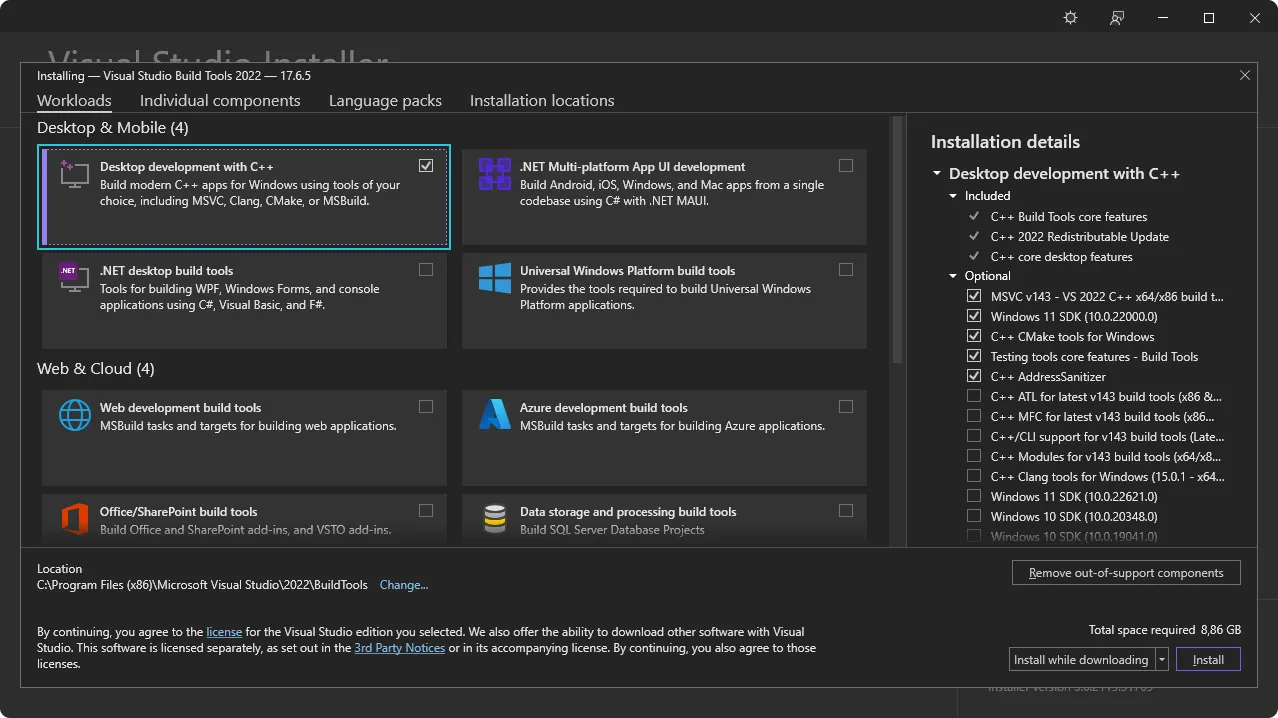
Next: [Install WebView2](#webview2).
#### WebView2
Tip
WebView 2 is already installed on Windows 10 (from version 1803 onward) and later versions of Windows. If you are developing on one of these versions then you can skip this step and go directly to [installing Rust](#rust).
Tauri uses Microsoft Edge WebView2 to render content on Windows.
Install WebView2 by visiting the [WebView2 Runtime download section](https://developer.microsoft.com/en-us/microsoft-edge/webview2/#download-section). Download the “Evergreen Bootstrapper” and install it.
Next: [Check VBSCRIPT](#vbscript-for-msi-installers)
#### VBSCRIPT (for MSI installers)
MSI package building only
This is only required if you plan to build MSI installer packages (`"targets": "msi"` or `"targets": "all"` in `tauri.conf.json`).
Building MSI packages on Windows requires the VBSCRIPT optional feature to be enabled. This feature is enabled by default on most Windows installations, but may have been disabled on some systems.
If you encounter errors like `failed to run light.exe` when building MSI packages, you may need to enable the VBSCRIPT feature:
1. Open **Settings** → **Apps** → **Optional features** → **More Windows features**
2. Locate **VBSCRIPT** in the list and ensure it’s checked
3. Click **Next** and restart your computer if prompted
**Note:** VBSCRIPT is currently enabled by default on most Windows installations, but is [being deprecated](https://techcommunity.microsoft.com/blog/windows-itpro-blog/vbscript-deprecation-timelines-and-next-steps/4148301) and may be disabled in future Windows versions.
Next: [Install Rust](#rust)
## Rust
Tauri is built with [Rust](https://www.rust-lang.org) and requires it for development. Install Rust using one of following methods. You can view more installation methods at .
* Linux and macOS
Install via [`rustup`](https://github.com/rust-lang/rustup) using the following command:
```sh
curl --proto '=https' --tlsv1.2 https://sh.rustup.rs -sSf | sh
```
Security Tip
We have audited this bash script, and it does what it says it is supposed to do. Nevertheless, before blindly curl-bashing a script, it is always wise to look at it first.
Here is the file as a plain script: [rustup.sh](https://sh.rustup.rs/)
* Windows
Visit to install `rustup`.
Alternatively, you can use `winget` to install rustup using the following command in PowerShell:
```powershell
winget install --id Rustlang.Rustup
```
MSVC toolchain as default
For full support for Tauri and tools like [`trunk`](https://trunk-rs.github.io/trunk/) make sure the MSVC Rust toolchain is the selected `default host triple` in the installer dialog. Depending on your system it should be either `x86_64-pc-windows-msvc`, `i686-pc-windows-msvc`, or `aarch64-pc-windows-msvc`.
If you already have Rust installed, you can make sure the correct toolchain is installed by running this command:
```powershell
rustup default stable-msvc
```
**Be sure to restart your Terminal (and in some cases your system) for the changes to take effect.**
Next: [Configure for Mobile Targets](#configure-for-mobile-targets) if you’d like to build for Android and iOS, or, if you’d like to use a JavaScript framework, [install Node](#nodejs). Otherwise [Create a Project](/start/create-project/).
## Node.js
JavaScript ecosystem
Only if you intend to use a JavaScript frontend framework
1. Go to the [Node.js website](https://nodejs.org), download the Long Term Support (LTS) version and install it.
2. Check if Node was successfully installed by running:
```sh
node -v
# v20.10.0
npm -v
# 10.2.3
```
It’s important to restart your Terminal to ensure it recognizes the new installation. In some cases, you might need to restart your computer.
While npm is the default package manager for Node.js, you can also use others like pnpm or yarn. To enable these, run `corepack enable` in your Terminal. This step is optional and only needed if you prefer using a package manager other than npm.
Next: [Configure for Mobile Targets](#configure-for-mobile-targets) or [Create a project](/start/create-project/).
## Configure for Mobile Targets
If you’d like to target your app for Android or iOS then there are a few additional dependencies that you need to install:
* [Android](#android)
* [iOS](#ios)
### Android
1. Download and install [Android Studio from the Android Developers website](https://developer.android.com/studio)
2. Set the `JAVA_HOME` environment variable:
* Linux
```sh
export JAVA_HOME=/opt/android-studio/jbr
```
* macOS
```sh
export JAVA_HOME="/Applications/Android Studio.app/Contents/jbr/Contents/Home"
```
* Windows
```ps
[System.Environment]::SetEnvironmentVariable("JAVA_HOME", "C:\Program Files\Android\Android Studio\jbr", "User")
```
3. Use the SDK Manager in Android Studio to install the following:
* Android SDK Platform
* Android SDK Platform-Tools
* NDK (Side by side)
* Android SDK Build-Tools
* Android SDK Command-line Tools
Selecting “Show Package Details” in the SDK Manager enables the installation of older package versions. Only install older versions if necessary, as they may introduce compatibility issues or security risks.
4. Set `ANDROID_HOME` and `NDK_HOME` environment variables.
* Linux
```sh
export ANDROID_HOME="$HOME/Android/Sdk"
export NDK_HOME="$ANDROID_HOME/ndk/$(ls -1 $ANDROID_HOME/ndk)"
```
* macOS
```sh
export ANDROID_HOME="$HOME/Library/Android/sdk"
export NDK_HOME="$ANDROID_HOME/ndk/$(ls -1 $ANDROID_HOME/ndk)"
```
* Windows
```ps
[System.Environment]::SetEnvironmentVariable("ANDROID_HOME", "$env:LocalAppData\Android\Sdk", "User")
$VERSION = Get-ChildItem -Name "$env:LocalAppData\Android\Sdk\ndk" | Select-Object -Last 1
[System.Environment]::SetEnvironmentVariable("NDK_HOME", "$env:LocalAppData\Android\Sdk\ndk\$VERSION", "User")
```
Tip
Most apps don’t refresh their environment variables automatically, so to let them pickup the changes, you can either restart your terminal and IDE or for your current PowerShell session, you can refresh it with
```ps
[System.Environment]::GetEnvironmentVariables("User").GetEnumerator() | % { Set-Item -Path "Env:\$($_.key)" -Value $_.value }
```
5. Add the Android targets with `rustup`:
```sh
rustup target add aarch64-linux-android armv7-linux-androideabi i686-linux-android x86_64-linux-android
```
Next: [Setup for iOS](#ios) or [Create a project](/start/create-project/).
### iOS
macOS Only
iOS development requires Xcode and is only available on macOS. Be sure that you’ve installed Xcode and not Xcode Command Line Tools in the [macOS system dependencies section](#macos).
1. Add the iOS targets with `rustup` in Terminal:
```sh
rustup target add aarch64-apple-ios x86_64-apple-ios aarch64-apple-ios-sim
```
2. Install [Homebrew](https://brew.sh):
```sh
/bin/bash -c "$(curl -fsSL https://raw.githubusercontent.com/Homebrew/install/HEAD/install.sh)"
```
3. Install [Cocoapods](https://cocoapods.org) using Homebrew:
```sh
brew install cocoapods
```
Next: [Create a project](/start/create-project/).
## Troubleshooting
If you run into any issues during installation be sure to check the [Troubleshooting Guide](/develop/debug/) or reach out on the [Tauri Discord](https://discord.com/invite/tauri).
Next Steps
Now that you’ve installed all of the prerequisites you’re ready to [create your first Tauri project](/start/create-project/)!
# Project Structure
A Tauri project is usually made of 2 parts, a Rust project and a JavaScript project (optional), and typically the setup looks something like this:
```plaintext
.
├── package.json
├── index.html
├── src/
│ ├── main.js
├── src-tauri/
│ ├── Cargo.toml
│ ├── Cargo.lock
│ ├── build.rs
│ ├── tauri.conf.json
│ ├── src/
│ │ ├── main.rs
│ │ └── lib.rs
│ ├── icons/
│ │ ├── icon.png
│ │ ├── icon.icns
│ │ └── icon.ico
│ └── capabilities/
│ └── default.json
```
In this case, the JavaScript project is at the top level, and the Rust project is inside `src-tauri/`, the Rust project is a normal [Cargo project](https://doc.rust-lang.org/cargo/guide/project-layout.html) with some extra files:
* `tauri.conf.json` is the main configuration file for Tauri, it contains everything from the application identifier to dev server url, this file is also a marker for the [Tauri CLI](/reference/cli/) to find the Rust project, to learn more about it, see [Tauri Config](/develop/configuration-files/#tauri-config)
* `capabilities/` directory is the default folder Tauri reads [capability files](/security/capabilities/) from (in short, you need to allow commands here to use them in your JavaScript code), to learn more about it, see [Security](/security/)
* `icons/` directory is the default output directory of the [`tauri icon`](/reference/cli/#icon) command, it’s usually referenced in `tauri.conf.json > bundle > icon` and used for the app’s icons
* `build.rs` contains `tauri_build::build()` which is used for tauri’s build system
* `src/lib.rs` contains the Rust code and the mobile entry point (the function marked with `#[cfg_attr(mobile, tauri::mobile_entry_point)]`), the reason we don’t write directly in `main.rs` is because we compile your app to a library in mobile builds and load them through the platform frameworks
* `src/main.rs` is the main entry point for the desktop, and we run `app_lib::run()` in `main` to use the same entry point as mobile, so to keep it simple, don’t modify this file, modify `lib.rs` instead. Note that `app_lib` corresponds to `[lib.name]` in Cargo.toml.
Tauri works similar to a static web host, and the way it builds is that you would compile your JavaScript project to static files first, and then compile the Rust project that will bundle those static files in, so the JavaScript project setup is basically the same as if you were to build a static website, to learn more, see [Frontend Configuration](/start/frontend/)
If you want to work with Rust code only, simply remove everything else and use the `src-tauri/` folder as your top level project or as a member of your Rust workspace
## Next Steps
* [Add and Configure a Frontend Framework](/start/frontend/)
* [Tauri Command Line Interface (CLI) Reference](/reference/cli/)
* [Learn how to develop your Tauri app](/develop/)
* [Discover additional features to extend Tauri](/plugin/)
# 404
> Page not found. Check the URL or try using the search bar.
If you're having trouble navigating, please [create an issue on GitHub](https://github.com/tauri-apps/tauri-docs/issues/new/choose) or [report on Discord](https://discord.com/invite/tauri).
# About Tauri
> Various information about Tauri from governance, philosophy, and trademark guidelines
Tip
If you’re looking for a quick technical overview and to start building an app then visit the [What is Tauri page](/start/). If you’d like to learn more about the project’s philosophy then keep reading.
[Tauri Philosophy](/about/philosophy/)Learn more about the approach behind Tauri
[Governance](/about/governance/)Understand how the Tauri governance structure is setup
[Trademark](/about/trademark/)Guidelines for using the Tauri trademark
# The Tauri Book
Progress Update
We’re actively working on authoring and writing The Tauri Book. We’ve encountered delays due to the immense growth of Tauri but have recently re-prioritized this project. While we don’t yet have details on the timelines of a release, you can keep an eye on this page for updates.
We’d like to apologize for this being delayed beyond the originally communicated publish date. If you’ve donated through GitHub Sponsors or Open Collective and would like to request a refund you may do so via Open Collective: [Contact Tauri on Open Collective](https://opencollective.com/tauri/contact).
### Overview
The Tauri Book will guide you through the history of Tauri and the design decisions we’ve made. It will also talk in depth about why privacy, security and sustainability are important and fundamental discussions you can apply to any modern software project.
Topics included are:
* The method and reasoning behind the design of Tauri
* The options you have when building with Tauri
* That you don’t have to choose between shipping fast and being sustainable and responsible
* Why we chose the Rust language as a binding and application layer for Tauri
* Why a binary review is important
### History
In 2020, the manufacture of native-apps has become easier and more accessible than ever before. All the same, beginners and seasoned developers alike are confronted with tough choices in a rapidly changing landscape of security and privacy. This is especially true in the semi-trusted environment of user devices.
Tauri takes the guesswork out of the equation, as it was designed from the ground up to embrace new paradigms of secure development and creative flexibility that leverage the language features of Rust and lets you build an app using any frontend framework you like. Find out how you can design, build, audit and deploy tiny, fast, robust, and secure native applications for the major desktop and mobile platforms, all from the exact same codebase and in record time - without even needing to know the Rust programming language.
Authors and Tauri co-founders Daniel and Lucas take you on a journey from theory to execution, during which you will learn why Tauri was built and how it works under the hood. Together with guest insights that specialize in Open Source, DevOps, Security and Enterprise Architecture, this book also presents discourse-formatted philosophical discussions and open-source sustainability viewpoints from which your next-gen apps will profit - and your users will benefit.
# Tauri Governance
One of the main goals of the organizational structure of Tauri is to guarantee we stay true to our open source values and do so sustainably while respecting the health and well-being of contributors. [The Tauri Programme within the Commons Conservancy](https://dracc.commonsconservancy.org/0035/) was established to commit to those values, and facilitate an open, transparent and efficient governance process throughout the future development of the Tauri and its auxiliary materials.
## Tauri Working Group
The Tauri Working Group is the collective framework created to enable this governance process. It’s composed of the following components:
* Working Group Members
* Tauri Board & Board Directors
* Domains & Domain Leads
* Teams
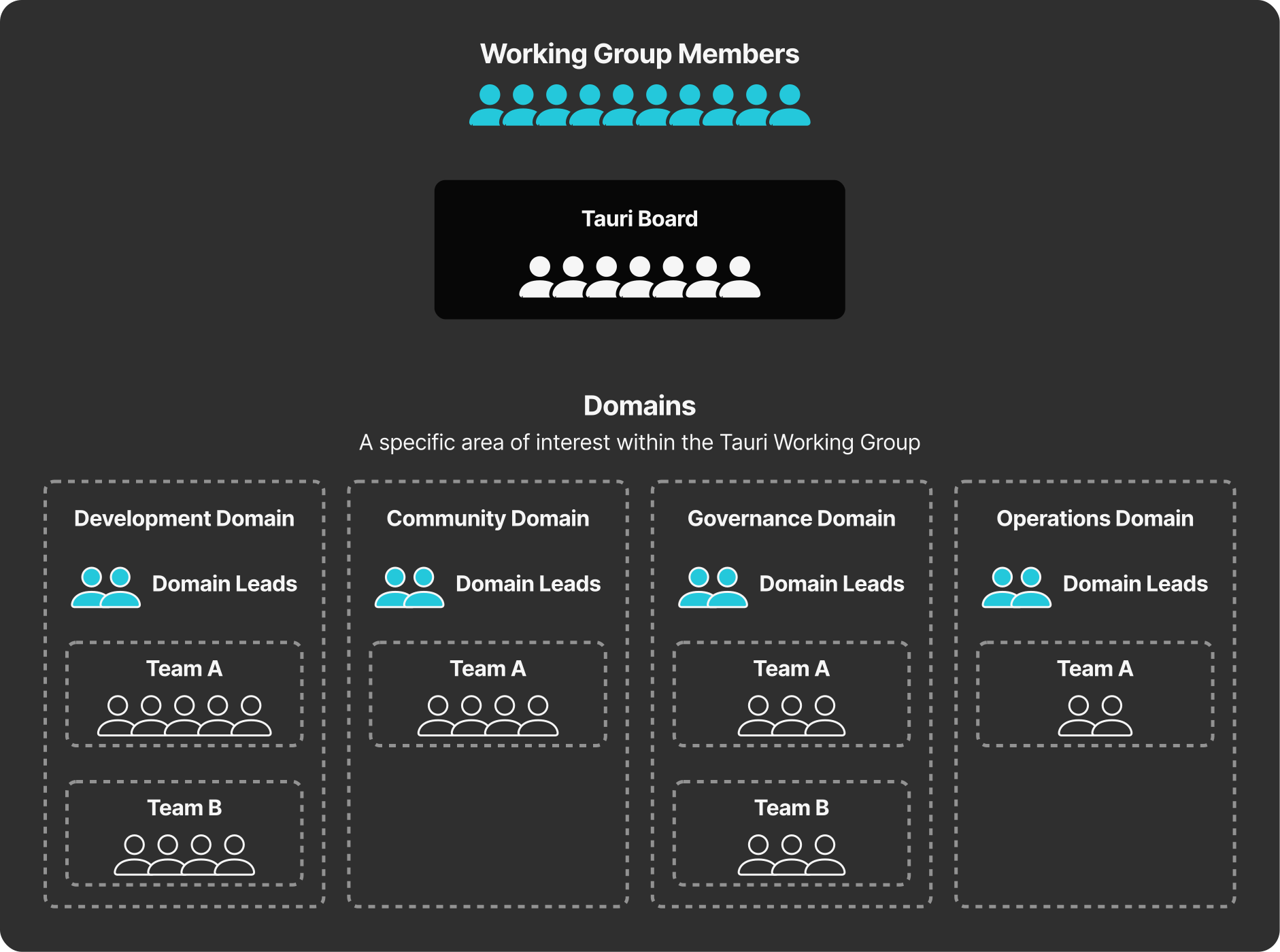
### Working Group Members
All of the individuals that make up the Tauri Working Group.
### Tauri Board & Board Directors
The Tauri Board is the central decision making body for the Tauri Programme and is responsible for the overall health and stability of the Tauri Programme. The Board votes on major decisions within the Programme and issues raised by the Working Group.
An individual Board Director may be a technical contributor, be a stakeholder in Tauri’s future, share experience from the industry, or have a passion for regulatory and legal aspects within Open Source.
### Domains & Domain Leads
Domains are organizational units that represent an area of interest within Tauri.
Domain Leads are trusted contributors within the Tauri community with expertise in the Domain they are leading. They are responsible for setting direction, overseeing and supporting the activities within that Domain.
The current Domains and Domain leads are outlined in the [Governance and Guidance repo on GitHub](https://github.com/tauri-apps/governance-and-guidance).
### Teams
Teams are small groups of contributors that support or maintain specific areas of the Tauri Programme. They are a means for Tauri to execute its longer-term tasks and goals, especially when ad-hoc contributions cannot achieve the same results.
## Get Involved
If you’re interested in becoming a Tauri Board Director or a Domain Lead, elections for those positions are run throughout the year. For Domain Leads those take place in both the spring and fall and for Board Directors in the summer. Instructions for how to apply are posted to the [Tauri Blog](https://tauri.app/blog) leading up to the respective election.
## Additional Resources
* [Governance and Guidance Repository](https://github.com/tauri-apps/governance-and-guidance): More detailed information about Tauri’s Governance and the current Domains and Domain Leads
* [Social Contract](https://github.com/tauri-apps/governance-and-guidance/blob/main/SOCIAL_CONTRACT.md): The social contract informs our decision making and organization
* [Code of Conduct](https://github.com/tauri-apps/governance-and-guidance/blob/main/CODE_OF_CONDUCT.md)
* [Tauri Programme Statutes](https://dracc.commonsconservancy.org/0035/)
# Tauri Philosophy
Tauri is a toolkit that helps developers make applications for the major desktop platforms - using virtually any frontend framework in existence. The core is built with Rust, and the CLI leverages Node.js making Tauri a genuinely polyglot approach to creating and maintaining great apps.
[YouTube video player](https://www.youtube-nocookie.com/embed/UxTJeEbZX-0?si=mwQUzXb6mmCg7aom)
## Security First
In today’s world, every honest threat model assumes that the user’s device has already been compromised. This puts app developers in a complicated situation because if the device is already at risk, how can the software be trusted?
Defense in depth is the approach we’ve taken. We want you to be able to take every precaution possible to minimize the surface area you present to attackers. Tauri lets you choose which API endpoints to ship, whether or not you want a localhost server built into your app, and it even randomizes functional handles at runtime. These and other techniques form a secure baseline that empowers you and your users.
Slowing down attackers by making static attacks crushingly difficult and isolating systems from one another is the name of the game. And if you are coming from the Electron ecosystem - rest assured - by default Tauri only ships binaries, not ASAR files.
By choosing to build Tauri with security as a guiding force, we give you every opportunity to take a proactive security posture.
## Polyglots, not Silos
Most contemporary frameworks use a single language paradigm and are therefore trapped in a bubble of knowledge and idiom. This can work well for certain niche applications, but it also fosters a kind of tribalism.
This can be seen in the way that the React, Angular, and Vue development communities huddle on their stacks, ultimately breeding very little cross-pollination.
This same situation can be seen in the Rust vs. Node vs. C++ battlefields, where hardliners take their stances and refuse to collaborate across communities.
Today, Tauri uses Rust for the backend - but in the not too distant future, other backends like Go, Nim, Python, Csharp, etc. will be possible. This is because we are maintaining the official Rust bindings to the [webview](https://github.com/webview) organization and plan to let you switch out the backend for your needs. Since our API can be implemented in any language with C interop, full compliance is only a PR away.
## Honest Open Source
None of this would make any sense without a community. Today software communities are amazing places where people help each other and make awesome things - open source is a very big part of that.
Open source means different things to different people, but most will agree that it serves to support freedom. When software doesn’t respect your rights, then it can seem unfair and potentially compromise your freedoms by operating in unethical ways.
This is why we are proud that FLOSS advocates can build applications with Tauri that are “certifiably” open source and can be included in FSF endorsed GNU/Linux distributions.
## The Future
Tauri’s future depends on your involvement and contributions. Try it out, file issues, join a working group or make a donation - every contribution is important. Please, at any rate, do get in touch!!!
# Trademark Guidelines
This trademark policy was prepared to help you understand how to use the TAURI trademarks, service marks and logos owned by the Tauri Programme within the Commons Conservancy.
While our software is available under a free and open source software license, that copyright license does not include a license to use our trademark, and this Policy is intended to explain how to use our marks consistent with background law and community expectation.
**This Policy covers:**
* Our word trademarks and service marks: TAURI, TAO, WRY
* Our logos: The TAURI, TAO, WRY logos (and all visual derivatives)
This policy encompasses all trademarks and service marks, whether they are registered or not.
## General Guidelines
Whenever you use one of our marks, you must always do so in a way that does not mislead anyone about what they are getting and from whom. For example, you cannot say you are distributing TAURI software when you’re distributing a modified version of it (aka a Fork), because recipients may not understand the differences between your modified versions and our own.
You also cannot use our logo on your website in a way that suggests that your website is an official website or that we endorse your website.
You can, though, say you like TAURI software, that you participate in the TAURI community, that you are providing an unmodified version of the TAURI software.
You may not use or register our marks, or variations of them as part of your own trademark, service mark, domain name, company name, trade name, product name or service name.
Trademark law does not allow your use of names or trademarks that are too similar to ours. You therefore may not use an obvious variation of any of our marks or any phonetic equivalent, foreign language equivalent, takeoff, or abbreviation for a similar or compatible product or service. We would consider the following too similar to one of our Marks:
* TAURIMAGE
* Tauri Wallet App
## Acceptable Uses
### Applications
TAURI is a framework for making applications for computing devices. You may claim that your application uses TAURI, but care should be taken to avoid giving the impression that your application is approved by The Tauri Programme within the Commons Conservancy, or is an official application. Care must be taken, not to ship your application with the default ICON.
### Plugins & Templates
You may publish the code for plugins and templates using the appropriate naming conventions, but please mention that these works are not officially approved. Only such codebases that are managed by the organization within the GitHub organization `tauri-apps` are considered official.
## Core Modifications (Forks)
If you distribute a modified version of our software (TAURI CORE), you must remove all of our logos and naming from it. You must retain our original license in SPDX format. You may use our word marks, but not our logos, to truthfully describe the origin of the software that you are providing. For example, if the code you are distributing is a modification of our software, you may say, “This software is derived from the source code for TAURI software.”
### Statements About Compatibility
You may use the word marks, but not the logos, to truthfully describe the relationship between your software and ours. Any other use may imply that we have certified or approved your software. If you wish to use our logos, please contact us to discuss license terms.
### Naming Compatible Products
If you wish to describe your product with reference to the TAURI software, here are the conditions under which you may do so. You may call your software XYZ (where XYZ is your product name) for TAURI only if:
* All versions of the TAURI software you deliver with your product are the exact binaries provided by us, or manufactured by the core software and tooling we provide.
* Your product is fully compatible with the APIs for the TAURI software.
* You use the following legend in marketing materials or product descriptions: “TAURI is a trademark of The Tauri Programme within the Commons Conservancy. ”
### User Groups
You can use the Word Marks as part of your user group name provided that:
* The main focus of the group is our software
* The group does not make a profit
* Any charge to attend meetings are to cover the cost of the venue, food and drink only
You are not authorized to conduct a conference using our marks.
### No Domain Names
You must not register any domain that includes our word marks or any variant or combination of them.
### Other For Profit Usage of the TAURI Marks
If you are making a video, tutorial series, book, or other educational material, for which you are receiving payment through subscriptions, sales, advertising or the like, then you must acquire explicit licensing permission from The Tauri Programme within the Commons Conservancy.
## How to Display Our Marks
When you have the right to use our mark, here is how to display it.
### Trademark Marking and Legends
The first or most prominent mention of a mark on a webpage, document, or documentation should be accompanied by a symbol indicating whether the mark is a registered trademark (“®”) or an unregistered trademark (“™”). If you don’t know which applies, contact us. (TAURI itself is a registered trademark.)
Place the following notice at the foot of the page where you have used the mark: TAURI is trademark of \[The Tauri Programme within the Commons Conservancy].”
### Use of Trademarks in Text
Always use trademarks in their exact form with the correct spelling, neither abbreviated, hyphenated, or combined with any other word or words.
* Unacceptable: TAUREE
* Acceptable: TAURI
Don’t pluralize a trademark.
* Unacceptable: I have seventeen TAURIs running on my computer.
* Acceptable: I am running seventeen TAURI applications on my computer and have ram to spare.
Always use a trademark as an adjective modifying a noun.
* Unacceptable: This is a TAURI.
* Acceptable: This is a TAURI software application.
### Use of Logos
You may not change any logo except to scale it. This means you may not add decorative elements, change the colors, change the proportions, distort it, add elements, or combine it with other logos.
We have a high-contrast version of the logo, which you can download below in the assets section.
## Assets
* Here you may download the entire [Brand Guidelines](/assets/brand_guidelines.pdf) - (PDF, 74.3 MB)
* Here you may download SVG and PNG formats of the LOGO and Wordmark in the [Logopack](/assets/logopack.zip) - (ZIP, 203 KB)
***
The Tauri Programme within the Commons Conservancy retains all rights to the modification of these trademark guidelines at any time. If you have a question or enquiry, please send an email to `trademark@tauri.app`.
These guidelines are based on the Model Trademark Guidelines, available at , used under a Creative Commons Attribution 3.0 Unported license: . Version 1.0 dated 20th, August 2022
# Core Concepts
> Topics that you should get more intimately familiar with if you want to get the most out of the framework
Tauri has a variety of topics that are considered to be core concepts, things any developer should be aware of when developing their applications. Here’s a variety of topics that you should get more intimately familiar with if you want to get the most out of the framework.
[Tauri Architecture](/concept/architecture/)Architecture and ecosystem.
[Inter-Process Communication (IPC)](/concept/inter-process-communication/)The inner workings on the IPC.
[Security](/security/)How Tauri enforces security practices.
[Process Model](/concept/process-model/)Which processes Tauri manages and why.
[App Size](/concept/size/)How to make your app as small as possible.
# Tauri Architecture
## Introduction
Tauri is a polyglot and generic toolkit that is very composable and allows engineers to make a wide variety of applications. It is used for building applications for desktop computers using a combination of Rust tools and HTML rendered in a Webview. Apps built with Tauri can ship with any number of pieces of an optional JS API and Rust API so that webviews can control the system via message passing. Developers can extend the default API with their own functionality and bridge the Webview and Rust-based backend easily.
Tauri apps can have [tray-type interfaces](/learn/system-tray/). They can be [updated](/plugin/updater/) and are managed by the user’s operating system as expected. They are very small because they use the OS’s webview. They do not ship a runtime since the final binary is compiled from Rust. This makes the [reversing of Tauri apps not a trivial task](/security/).
### What Tauri is Not
Tauri is not a lightweight kernel wrapper. Instead, it directly uses [WRY](#wry) and [TAO](#tao) to do the heavy lifting in making system calls to the OS.
Tauri is not a VM or virtualized environment. Instead, it is an application toolkit that allows making Webview OS applications.
## Core Ecosystem
Simplified representation of the Tauri architecture.
### tauri
[View on GitHub](https://github.com/tauri-apps/tauri/tree/dev/crates/tauri)
This is the major crate that holds everything together. It brings the runtimes, macros, utilities and API into one final product. It reads the [`tauri.conf.json`](/reference/config/) file at compile time to bring in features and undertake the actual configuration of the app (and even the `Cargo.toml` file in the project’s folder). It handles script injection (for polyfills / prototype revision) at runtime, hosts the API for systems interaction, and even manages the updating process.
### tauri-runtime
[View on GitHub](https://github.com/tauri-apps/tauri/tree/dev/crates/tauri-runtime)
The glue layer between Tauri itself and lower-level webview libraries.
### tauri-macros
[View on GitHub](https://github.com/tauri-apps/tauri/tree/dev/crates/tauri-macros)
Creates macros for the context, handler, and commands by leveraging the [`tauri-codegen`](https://github.com/tauri-apps/tauri/tree/dev/crates/tauri-codegen) crate.
### tauri-utils
[View on GitHub](https://github.com/tauri-apps/tauri/tree/dev/crates/tauri-utils)
Common code that is reused in many places and offers useful utilities like parsing configuration files, detecting platform triples, injecting the CSP, and managing assets.
### tauri-build
[View on GitHub](https://github.com/tauri-apps/tauri/tree/dev/crates/tauri-build)
Applies the macros at build-time to rig some special features needed by `cargo`.
### tauri-codegen
[View on GitHub](https://github.com/tauri-apps/tauri/tree/dev/crates/tauri-codegen)
Embeds, hashes, and compresses assets, including icons for the app as well as the system tray. Parses [`tauri.conf.json`](/reference/config/) at compile time and generates the Config struct.
### tauri-runtime-wry
[View on GitHub](https://github.com/tauri-apps/tauri/tree/dev/crates/tauri-runtime-wry)
This crate opens up direct systems-level interactions specifically for WRY, such as printing, monitor detection, and other windowing-related tasks.
## Tauri Tooling
### API (JavaScript / TypeScript)
[View on GitHub](https://github.com/tauri-apps/tauri/tree/dev/packages/api)
A typescript library that creates `cjs` and `esm` JavaScript endpoints for you to import into your frontend framework so that the Webview can call and listen to backend activity. Also ships in pure typescript, because for some frameworks this is more optimal. It uses the message passing of webviews to their hosts.
### Bundler (Rust / Shell)
[View on GitHub](https://github.com/tauri-apps/tauri/tree/dev/crates/tauri-bundler)
A library that builds a Tauri app for the platform it detects or is told. Currently supports macOS, Windows and Linux - but in the near future will support mobile platforms as well. May be used outside of Tauri projects.
### cli.rs (Rust)
[View on GitHub](https://github.com/tauri-apps/tauri/tree/dev/crates/tauri-cli)
This Rust executable provides the full interface to all of the required activities for which the CLI is required. It runs on macOS, Windows, and Linux.
### cli.js (JavaScript)
[View on GitHub](https://github.com/tauri-apps/tauri/tree/dev/packages/cli)
Wrapper around [`cli.rs`](https://github.com/tauri-apps/tauri/blob/dev/crates/tauri-cli) using [`napi-rs`](https://github.com/napi-rs/napi-rs) to produce npm packages for each platform.
### create-tauri-app (JavaScript)
[View on GitHub](https://github.com/tauri-apps/create-tauri-app)
A toolkit that will enable engineering teams to rapidly scaffold out a new `tauri-apps` project using the frontend framework of their choice (as long as it has been configured).
## Upstream Crates
The Tauri-Apps organization maintains two “upstream” crates from Tauri, namely TAO for creating and managing application windows, and WRY for interfacing with the Webview that lives within the window.
### TAO
[View on GitHub](https://github.com/tauri-apps/tao)
Cross-platform application window creation library in Rust that supports all major platforms like Windows, macOS, Linux, iOS and Android. Written in Rust, it is a fork of [winit](https://github.com/rust-windowing/winit) that we have extended for our own needs - like menu bar and system tray.
### WRY
[View on GitHub](https://github.com/tauri-apps/wry)
WRY is a cross-platform WebView rendering library in Rust that supports all major desktop platforms like Windows, macOS, and Linux. Tauri uses WRY as the abstract layer responsible to determine which webview is used (and how interactions are made).
## Additional Tooling
### tauri-action
[View on GitHub](https://github.com/tauri-apps/tauri-action)
GitHub workflow that builds Tauri binaries for all platforms. Even allows creating a (very basic) Tauri app even if Tauri is not set up.
### tauri-vscode
[View on GitHub](https://github.com/tauri-apps/tauri-vscode)
This project enhances the Visual Studio Code interface with several nice-to-have features.
## Plugins
[Tauri Plugin Guide](/develop/plugins/)
Generally speaking, plugins are authored by third parties (even though there may be official, supported plugins). A plugin generally does 3 things:
1. Enables Rust code to do “something”.
2. Provides interface glue to make it easy to integrate into an app.
3. Provides a JavaScript API for interfacing with the Rust code.
Here are some examples of Tauri Plugins:
* [tauri-plugin-fs](https://github.com/tauri-apps/tauri-plugin-fs)
* [tauri-plugin-sql](https://github.com/tauri-apps/tauri-plugin-sql)
* [tauri-plugin-stronghold](https://github.com/tauri-apps/tauri-plugin-stronghold)
## License
Tauri itself is licensed under MIT or Apache-2.0. If you repackage it and modify any source code, it is your responsibility to verify that you are complying with all upstream licenses. Tauri is provided AS-IS with no explicit claim for suitability for any purpose.
Here you may peruse our [Software Bill of Materials](https://app.fossa.com/projects/git%2Bgithub.com%2Ftauri-apps%2Ftauri).
# Inter-Process Communication
Inter-Process Communication (IPC) allows isolated processes to communicate securely and is key to building more complex applications.
Learn more about the specific IPC patterns in the following guides:
[Brownfield](/concept/inter-process-communication/brownfield/)
[Isolation](/concept/inter-process-communication/isolation/)
Tauri uses a particular style of Inter-Process Communication called [Asynchronous Message Passing](https://en.wikipedia.org/wiki/Message_passing#Asynchronous_message_passing), where processes exchange *requests* and *responses* serialized using some simple data representation. Message Passing should sound familiar to anyone with web development experience, as this paradigm is used for client-server communication on the internet.
Message passing is a safer technique than shared memory or direct function access because the recipient is free to reject or discard requests as it sees fit. For example, if the Tauri Core process determines a request to be malicious, it simply discards the requests and never executes the corresponding function.
In the following, we explain Tauri’s two IPC primitives - `Events` and `Commands` - in more detail.
## Events
Events are fire-and-forget, one-way IPC messages that are best suited to communicate lifecycle events and state changes. Unlike [Commands](#commands), Events can be emitted by both the Frontend *and* the Tauri Core.
Events sent between the Core and the Webview.
Under the hood, events still utilize Commands, and the access to the events API is controlled by the [Event permissions](/reference/acl/core-permissions/#event).
## Commands
Tauri also provides a [foreign function interface](https://en.wikipedia.org/wiki/Foreign_function_interface)-like abstraction on top of IPC messages[1](#user-content-fn-1). The primary API, `invoke`, is similar to the browser’s `fetch` API and allows the Frontend to invoke Rust functions, pass arguments, and receive data.
Because this mechanism uses a [JSON-RPC](https://www.jsonrpc.org) like protocol under the hood to serialize requests and responses, all arguments and return data must be serializable to JSON.
IPC messages involved in a command invocation.
## Footnotes
1. Because Commands still use message passing under the hood, they do not share the same security pitfalls as real FFI interfaces do. [↩](#user-content-fnref-1)
# Brownfield Pattern
***This is the default pattern.***
This is the simplest and most straightforward pattern to use Tauri with, because it tries to be as compatible as possible with existing frontend projects. In short, it tries to require nothing additional to what an existing web frontend might use inside a browser. Not ***everything*** that works in existing browser applications will work out-of-the-box.
If you are unfamiliar with Brownfield software development in general, the [Brownfield Wikipedia article](https://en.wikipedia.org/wiki/Brownfield_\(software_development\)) provides a nice summary. For Tauri, the existing software is current browser support and behavior, instead of legacy systems.
## Configuration
Because the Brownfield pattern is the default pattern, it doesn’t require a configuration option to be set. To explicitly set it, you can use the `app > security > pattern` object in the `tauri.conf.json` configuration file.
```json
{
"app": {
"security": {
"pattern": {
"use": "brownfield"
}
}
}
}
```
***There are no additional configuration options for the brownfield pattern.***
# Isolation Pattern
The Isolation pattern is a way to intercept and modify Tauri API messages sent by the frontend before they get to Tauri Core, all with JavaScript. The secure JavaScript code that is injected by the Isolation pattern is referred to as the Isolation application.
## Why
The Isolation pattern’s purpose is to provide a mechanism for developers to help protect their application from unwanted or malicious frontend calls to Tauri Core. The need for the Isolation pattern rose out of threats coming from untrusted content running on the frontend, a common case for applications with many dependencies. See [Security: Threat Models](/security/lifecycle/) for a list of many sources of threats that an application may see.
The largest threat model described above that the Isolation pattern was designed in mind was Development Threats. Not only do many frontend build-time tools consist of many dozen (or hundreds) of often deeply-nested dependencies, but a complex application may also have a large amount of (also often deeply-nested) dependencies that are bundled into the final output.
## When
Tauri highly recommends using the isolation pattern whenever it can be used. Because the Isolation application intercepts ***all*** messages from the frontend, it can *always* be used.
Tauri also strongly suggests locking down your application whenever you use external Tauri APIs. As the developer, you can utilize the secure Isolation application to try and verify IPC inputs, to make sure they are within some expected parameters. For example, you may want to check that a call to read or write a file is not trying to access a path outside your application’s expected locations. Another example is making sure that a Tauri API HTTP fetch call is only setting the Origin header to what your application expects it to be.
That said, it intercepts ***all*** messages from the frontend, so it will even work with always-on APIs such as [Events](/reference/javascript/api/namespaceevent/). Since some events may cause your own rust code to perform actions, the same sort of validation techniques can be used with them.
## How
The Isolation pattern is all about injecting a secure application in between your frontend and Tauri Core to intercept and modify incoming IPC messages. It does this by using the sandboxing feature of `